
BGMI Best Sensitivity Code 2026: Zero Recoil Guide
Finding the right sensitivity settings in Battlegrounds Mobile India (BGMI) can make a noticeable difference to aiming, camera movement, spray control, and close-range fights. However, there is an important point that many sensitivity guides get wrong: no sensitivity code can literally remove weapon recoil.
Sensitivity controls how quickly your view and aim respond to your finger or device movement. Recoil is still part of the game’s weapon mechanics, so the best settings should be viewed as a way to make recoil easier to control, not eliminate it completely.
BGMI continues to offer customizable controls and competitive multiplayer gameplay, and the official game is regularly updated with new content and features.
This guide explains how to build a practical 2026 sensitivity setup for both gyroscope and non-gyroscope players, how to adjust it for different scopes, and how to test your settings before using them in ranked matches.
What Is BGMI Sensitivity?
Sensitivity determines how much your camera or crosshair moves when you swipe or tilt your device.
For example, if your camera sensitivity is too high, a small finger movement can move your crosshair much farther than expected. If it is too low, you may have difficulty quickly tracking an enemy.
BGMI sensitivity is generally divided into several categories:
- Camera Sensitivity
- ADS Sensitivity
- Gyroscope Sensitivity
- ADS Gyroscope Sensitivity
- Free Look Sensitivity
Each category serves a different purpose.
A good setup therefore isn’t simply about finding the highest possible percentage. It is about creating a balance between speed, control, tracking and recoil management.
Does BGMI Have a True Zero-Recoil Sensitivity Code?
No.
There is no sensitivity setting that guarantees completely zero recoil for every weapon, device and player.
You may see websites or videos describing particular settings as “100% zero recoil”, but that wording should be treated cautiously. Sensitivity can help you control recoil, but it cannot change the underlying weapon behavior.
Some published BGMI sensitivity guides provide codes or recommended ranges, but even those settings can behave differently depending on the player’s device, frame rate, screen size, touch response, control layout and personal technique.
A more accurate way to think about “zero recoil” sensitivity is:
A sensitivity setup that makes recoil easier for you to control.
That distinction is important if you want your gaming content to remain accurate and trustworthy.
Recommended BGMI Sensitivity Settings for 2026
Rather than claiming that one imported code works perfectly for everyone, start with a balanced configuration and adjust it through Training Ground testing.
Camera Sensitivity
Camera sensitivity affects how quickly your view moves when you swipe without firing.
| Setting | Starting Range |
|---|---|
| TPP No Scope | 105–120% |
| FPP No Scope | 90–105% |
| Red Dot / Holographic | 50–65% |
| 2x Scope | 35–45% |
| 3x Scope | 25–35% |
| 4x Scope / VSS | 20–30% |
| 6x Scope | 12–20% |
| 8x Scope | 8–15% |
These are starting ranges, not universal values.
A current 2026 sensitivity guide for PUBG Mobile, which shares the same general sensitivity concepts, similarly recommends higher no-scope sensitivity and progressively lower values as magnification increases.
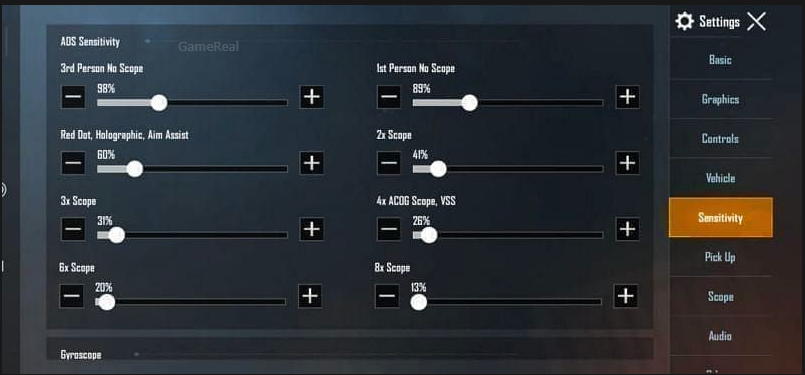
ADS Sensitivity for Better Spray Control
ADS, or Aim Down Sight, sensitivity influences how your aim behaves while firing.
A useful starting point is:
| Setting | Starting Range |
|---|---|
| TPP No Scope | 90–110% |
| FPP No Scope | 80–95% |
| Red Dot / Holographic | 45–60% |
| 2x Scope | 30–42% |
| 3x Scope | 22–32% |
| 4x Scope / VSS | 18–27% |
| 6x Scope | 12–18% |
| 8x Scope | 8–14% |
The goal is not to make every value extremely high.
If your ADS sensitivity is too high, you may overcorrect while controlling vertical recoil. If it is too low, pulling down against recoil may feel slow.
A good setup allows you to make small corrections without fighting your own sensitivity.
BGMI Gyroscope Sensitivity
If your phone supports gyroscope controls and you are comfortable using them, gyro can provide another method for controlling aim and recoil.
A reasonable starting configuration is:
| Gyroscope Setting | Starting Range |
|---|---|
| TPP No Scope | 250–300% |
| FPP No Scope | 250–300% |
| Red Dot / Holographic | 250–300% |
| 2x Scope | 220–280% |
| 3x Scope | 180–240% |
| 4x Scope / VSS | 160–220% |
| 6x Scope | 80–130% |
| 8x Scope | 50–90% |
These ranges are deliberately presented as starting points, rather than pretending there is one perfect configuration.
Some published 2026 guides use considerably different values, which demonstrates why copying another player’s settings does not automatically produce identical results.
Why Gyroscope Can Help With Recoil
With gyroscope enabled, you can use physical device movement to make small aim adjustments.
During a spray, you can gently tilt the phone downward to compensate for upward weapon movement.
This can be especially useful when:
- Controlling automatic rifles
- Tracking moving targets
- Making small vertical corrections
- Maintaining a spray at medium range
- Adjusting aim while moving
However, gyro sensitivity that is too high can make your crosshair unstable.
If your aim shakes when you make small movements, reduce the relevant gyro value instead of immediately increasing it.
Best Sensitivity for M416 Spray
The M416 is commonly used for testing sensitivity because it provides a useful benchmark for automatic weapon control.
For a practical test:
- Enter Training Ground.
- Equip the M416.
- Add a suitable sight.
- Stand at a consistent distance.
- Fire a full magazine at a target.
- Observe the vertical and horizontal movement.
- Adjust only one sensitivity value.
- Repeat the test.
Don’t change five settings simultaneously.
If you change everything at once, you won’t know which adjustment actually improved your aim.
Best Sensitivity for Red Dot
Red Dot sensitivity is particularly important for close and medium-range fights.
If your Red Dot sensitivity is too low:
- Tracking can feel slow.
- Fast targets may move outside your crosshair.
- Close-range corrections can become difficult.
If it is too high:
- Your crosshair can move past the target.
- Small finger movements become exaggerated.
- Spray control may feel inconsistent.
A starting range around 50–65% for camera sensitivity is reasonable for testing, but your final value should depend on your control style.
Best 3x Scope Sensitivity
The 3x scope is often useful for medium-range automatic sprays.
A starting camera sensitivity around 25–35% and an ADS value around 22–32% can provide a useful baseline.
For gyro players, you can start higher and gradually reduce the value if the crosshair becomes difficult to stabilize.
The important part is consistency.
You should be able to:
- Track a moving enemy.
- Pull against vertical recoil.
- Stop the spray accurately.
- Make small horizontal corrections.
If you can do these things comfortably, the exact percentage matters less than whether the setting matches your muscle memory.
Best 4x Scope Sensitivity
The 4x scope requires more controlled movement because the higher magnification makes small crosshair movements more noticeable.
A reasonable starting point is:
Camera: 20–30%
ADS: 18–27%
Gyroscope: 160–220%
Don’t automatically increase 4x sensitivity simply because your recoil feels difficult.
Instead, test whether the problem is:
- Excessive sensitivity
- Insufficient sensitivity
- Poor recoil technique
- Unstable frame rate
- Touch-response problems
Sensitivity is only one part of the equation.
6x Scope Settings
The 6x scope behaves differently because high magnification makes movement more sensitive.
A lower sensitivity is generally easier to manage.
Start around:
Camera: 12–20%
ADS: 12–18%
Gyroscope: 80–130%
When practicing 6x sprays, try different zoom levels where the game allows you to adjust them. Your preferred setup may differ significantly from another player’s.
Non-Gyroscope BGMI Sensitivity
Not every player uses gyro.
If you play without gyroscope, your finger movement becomes more important for recoil compensation.
For non-gyro players, focus on:
- Camera sensitivity
- ADS sensitivity
- Finger placement
- Drag consistency
- Crosshair positioning
- Movement during gunfights
A common mistake is copying a professional gyro player’s sensitivity and expecting similar results without gyro.
That usually doesn’t work.
Your sensitivity needs to match your control method.
BGMI Sensitivity Code vs Manual Settings
Sensitivity codes can be convenient because they allow players to import another configuration rather than entering every value manually.
However, an imported code is not automatically the best setup for your device.
Different players may use:
- Different screen sizes
- Different refresh rates
- Different touch sampling rates
- Different FPS settings
- Different control layouts
- Different finger counts
- Gyroscope or non-gyro controls
Therefore, treat a sensitivity code as a starting configuration.
After importing it, spend time in Training Ground before using it in ranked matches.
How to Test Your Sensitivity Properly
Don’t test sensitivity by playing one Classic match and deciding whether it works.
Use a controlled process.
Step 1: Start With One Weapon
Use an automatic rifle that you regularly play with.
Step 2: Choose One Scope
Start with Red Dot or 2x.
Step 3: Fire Repeated Sprays
Perform several sprays from the same distance.
Step 4: Change One Setting
Increase or decrease the relevant value slightly.
Step 5: Repeat
Compare the result with your previous setting.
Step 6: Test Moving Targets
Once your stationary spray feels comfortable, practice tracking moving targets.
Step 7: Test in Real Matches
Only after the settings feel consistent should you move into Classic or ranked gameplay.
How to Fix Recoil Without Changing Everything
If your gun moves upward while spraying, don’t immediately change every sensitivity value.
First identify the problem.
If the crosshair moves too quickly downward
Your sensitivity may be too high for your current movement.
Try reducing it slightly.
If you cannot pull down quickly enough
Your sensitivity may be too low.
Increase it gradually.
If the crosshair shakes left and right
Your sensitivity may be too high, or your hand movement may be inconsistent.
Reduce the relevant value and practice controlled movement.
If your aim feels delayed
Check device performance, FPS stability and touch response before blaming sensitivity.
Device Performance Also Matters
Sensitivity alone cannot compensate for poor performance.
If your frame rate is unstable, your aiming experience may feel inconsistent even when your sensitivity settings are unchanged.
BGMI’s official mobile listing describes the game as supporting multiplayer modes and customizable gameplay controls, while the game continues receiving updates and new content.
Before changing sensitivity repeatedly, make sure:
- Your device isn’t overheating.
- Your FPS setting is stable.
- Background applications are minimized.
- Your screen is clean.
- Touch input is working correctly.
- Your internet connection is reasonably stable.
These factors can affect how gameplay feels.
Don’t Copy a Pro Player’s Settings Blindly
A professional player’s sensitivity can be useful for experimentation, but it isn’t necessarily ideal for you.
Professional players may have:
- Thousands of hours of practice.
- Different devices.
- Different screen dimensions.
- Different finger layouts.
- Different gyro habits.
- Different aiming techniques.
The important thing is not to copy their numbers perfectly.
Instead, understand why their settings work for their play style and use them as a reference.
Common BGMI Sensitivity Mistakes
1. Changing Settings Every Day
Muscle memory requires consistency.
If you change your sensitivity after every bad match, your hands never get enough time to adapt.
2. Using Extremely High Sensitivity
High sensitivity isn’t automatically better.
It can make fast turns easier but may reduce precision.
3. Using One Setting for Everything
Different scopes have different magnification levels and therefore different control requirements.
4. Blaming Sensitivity for Every Missed Shot
Aim errors can also come from positioning, movement, reaction time and crosshair placement.
5. Testing Only in Ranked Matches
Ranked matches aren’t ideal for experimentation.
Use Training Ground first.
6. Believing “100% Zero Recoil” Claims
No sensitivity configuration guarantees literal zero recoil.
That claim is better treated as marketing language than a technical guarantee.
Best BGMI Sensitivity Setup for Beginners
If you’re new to sensitivity customization, don’t start with extreme values.
Use moderate settings and gradually adjust them.
A beginner-friendly process is:
Camera: Medium
ADS: Medium
Gyroscope: Medium to High if comfortable
Then adjust each scope individually.
Spend at least several practice sessions with your configuration before making major changes.
Best BGMI Sensitivity for Close-Range Fights
Close-range fights require fast target tracking.
Your no-scope and Red Dot settings therefore deserve particular attention.
You want enough sensitivity to:
- Turn quickly.
- Track enemies.
- Control movement.
- Make rapid corrections.
But excessive sensitivity can cause your crosshair to pass the target.
Practice hip-fire and Red Dot tracking separately.
Best BGMI Sensitivity for Long-Range Fights
Long-range aiming generally benefits from more controlled movement.
Higher sensitivity can make small adjustments difficult at high magnification.
For 6x and 8x scopes, start lower and increase gradually if your aim feels too slow.
The objective is precision rather than speed.
Does Sensitivity Improve Headshots?
Sensitivity can help you control your crosshair, but it does not automatically create headshots.
Headshot accuracy also depends on:
- Crosshair placement
- Reaction time
- Weapon choice
- Recoil control
- Movement
- Positioning
- Practice
- Target tracking
A good sensitivity setup simply gives you a control environment where these skills can be developed.
Recommended 2026 Setup Summary
Here’s a practical starting configuration:
| Setting | Recommended Starting Point |
|---|---|
| TPP No Scope Camera | 110% |
| FPP No Scope Camera | 95% |
| Red Dot Camera | 60% |
| 2x Camera | 40% |
| 3x Camera | 30% |
| 4x Camera | 25% |
| 6x Camera | 15% |
| 8x Camera | 10% |
| Red Dot ADS | 55% |
| 2x ADS | 35% |
| 3x ADS | 27% |
| 4x ADS | 22% |
| 6x ADS | 15% |
| 8x ADS | 10% |
For gyro users, begin with a moderate-to-high gyro configuration and tune each scope according to your control.
These numbers are a starting point, not an official BGMI “zero recoil” configuration.
Frequently Asked Questions
What is the best BGMI sensitivity code in 2026?
There isn’t one sensitivity code that is objectively best for every player. A suitable configuration depends on your device, FPS, control layout, gyro usage and personal preference.
Can sensitivity give zero recoil in BGMI?
No. Sensitivity can make recoil easier to manage, but it cannot guarantee completely zero recoil.
Is gyroscope better for recoil control?
Gyroscope can provide additional control over your aim and can be useful for recoil compensation, but it requires practice. Some players may prefer non-gyro controls.
Should I copy a professional player’s sensitivity?
You can use a professional player’s settings as a starting reference, but you should customize them for your own device and play style.
How often should I change sensitivity?
Avoid making constant changes. Test a configuration thoroughly and make small adjustments only when you identify a specific problem.
What is the best sensitivity for M416?
There is no universal M416 sensitivity. Start with moderate Red Dot, 3x and 4x settings and adjust them in Training Ground based on your spray pattern.
Does a better phone require different sensitivity?
Not necessarily, but differences in screen size, refresh rate, touch response and FPS can affect how a sensitivity setting feels.
Final Verdict
The best BGMI sensitivity code for 2026 isn’t necessarily the one with the highest numbers or a “100% zero recoil” label.
A better approach is to start with a balanced configuration, test it in Training Ground, and adjust individual settings according to your device and control style.
For gyroscope players, gyro can provide an additional way to manage recoil and make fine aim adjustments. For non-gyro players, ADS sensitivity, finger movement and consistent practice become even more important.
Most importantly, don’t keep changing your sensitivity after every bad match. Give your settings enough time to become familiar, identify one specific weakness, make a small adjustment, and test again.
BGMI is continuously updated, so sensitivity guides should also be reviewed whenever major gameplay or control changes are introduced. The official BGMI website and app listings are the best places to verify current game information