
Star Trek: Outposts Unknown PC Requirements Decoded
Having a high-end graphics card is not the only important spec to check when buying a PC strategy game. In a colony builder game, processor, RAM and how the game manages an expanding colony can be as important as graphic performance.
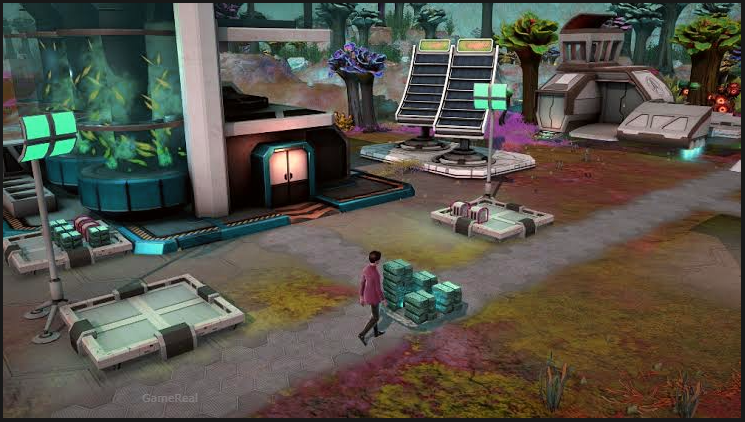
Star Trek: Outposts Unknown players build research stations, assign crew to the away missions, investigate new worlds and handle a menace in the X’Lehari System. Star Trek: Outposts Unknown is a turn-based strategy and outpost-management experience that features a new Star Trek story developed by Magic Fuel Games and published by Playstack.
The game is expected to be released on Steam 20/10/2026. If you intend to play on day one, checking out the official system requirements is a good idea. The minimum requirements offer a minimum baseline, while the recommended specs helps you better compare your computer.
This guide explains the meaning behind each requirement, how to check your current hardware, and what you should avoid making assumptions about a spec list. The idea is to enable you to make a more informed choice on whether to download or buy the game.
Star Trek: Outposts Unknown Release Date and PC Availability
Star Trek: Outposts Unknown is set to release on October 20, 2026 for Windows PC via Steam. The title is a single-player strategy game set in the 23rd century, the same era as featured in Star Trek: Strange New Worlds.
This includes building research stations, exploring planets, researching technologies, assigning crew tasks and dealing with hazardous incidents. And you’ll make choices while you assist a vulnerable civilization in the face of a mysterious cosmic menace.
The Official Steam Page notices it as a single player game, which features steam achievements, steam cloud and family sharing as well.
As of yet, the latest pre-launch listing check, Steam continued to show an upcoming release date rather than indicating that the game was already playable. If you are reading this at the time of release or thereafter, do check the live store status.
Star Trek: Outposts Unknown System Requirements
The below are based on the game’s released Steam requirements. One thing to note: the minimum NVIDIA graphics card listed on the Steam listing varied based on different obtained versions. The current should be confirmed on the official listing before making a buying decision.
Component
Minimum requirements
Recommended requirements
Operating system
Windows 10, version 21H1
64-bit operating system
Processor
AMD Ryzen 5 2600 or Intel Core i5-8500
AMD Ryzen 7 7800X3D or Intel Core i5-14600K
Memory
16 GB RAM
16 GB RAM
Graphics card
NVIDIA GTX 1660 (6 GB) or AMD Radeon RX 5600 XT (8 GB)
NVIDIA GeForce RTX 3060 or AMD Radeon RX 5700 XT
Storage
10 GB of available space
10 GB of available space
A graphics card update: Some retrieved Steam listing versions show an NVIDIA RTX 2060 with 6 GB of VRAM in place of the GTX 1660. Since these are two different GPU models, do not treat the conflicting wordings as confirmation that both cards can be officially interchanged. Make sure to check the live system requirements to see if your PC meets the requirements.
The table also does not provide a guaranteed resolution, frame rate or graphics preset. Those results require solid benchmarks rather than simply hardware name comparisons.
Minimum Requirements: What They Really Mean
Minimum requirements are a starting point, not a guarantee that every aspect of the game will run flawlessly at all times.
Processor: Ryzen 5 2600 or Core i5-8500
The minimum processor requirement provides two benchmarks: the AMD Ryzen 5 2600 and the Intel Core i5-8500.
The processor carries out the instructions and calculations required by the game. In a strategy game, this could involve coordinating simulated systems, processing management decisions, and changing the state of the game world.
The specific CPU load depends on how the game is implemented. The presence of outpost management in Outposts Unknown does not necessarily mean that it will become CPU-bound in a large settlement, and it is too early to declare a certain performance bottleneck without testing.
To find your CPU on Windows:
Open Task Manager by pressing Ctrl + Shift + Esc.
Go to the Performance tab.
Select CPU.
Note down the processor model shown in the top-right.
Match the full model name with the official requirements. A processor being marketed as a Ryzen 5 or Core i5 is not sufficient to guarantee compatibility, as performance differs between generations and models.
Graphics card: GTX 1660 or Radeon RX 5600 XT
The graphics requirement is arguably the most important check when building a gaming PC.
The minimum NVIDIA option listed is a GTX 1660 6 GB, and the AMD option is a Radeon RX 5600 XT 8 GB. However, the presence of conflicting RTX 2060 messaging on another version of the Steam listing means you will want to confirm the requirement yourself before trusting the NVIDIA comparison.
The GTX 1660 is not the GTX 1660 Super, GTX 1660 Ti or RTX 2060. They are different models and not directly interchangeable in terms of specifications.
Similarly, a higher model number does not necessarily indicate that a GPU will perform well in every game. Architecture, VRAM, drivers and the specific workload all influence the outcome.
To verify your graphics card:
Open Task Manager.
Click on Performance.
Click on GPU.
Note down the GPU model and dedicated GPU memory.
If your computer has integrated graphics, not a discrete graphics card, you will need to check the exact model of your integrated graphics, and not just assume that the processor’s name makes it compatible. The official listing does not guarantee that every integrated GPU will function.
RAM: 16 GB recommended
Both the minimum and the recommended specs are 16 GB of RAM.
RAM is consumed not only by Windows, the game and the game itself. If you have 8 GB, your machine is under the stated memory requirement for this game, even if your processor and graphics card are up to snuff.
A 16 GB PC meets the stated amount of memory, but that amount can vary greatly depending on what’s running in the background.
Close all other programs such as other games, heavy editing software, browsing on multiple tabs etc., before launching the game. This won’t magically transform subpar hardware into speedier hardware, but it will eliminate some unnecessary fighting over memory.
You won’t find anywhere in the published requirements that 32 GB is a recommendation. However, there is no compelling reason to upgrade to 32 GB based on this listing alone unless you have other reasons to suspect your workload requires it.
Storage: 10 GB of space
Available free storage The Steam requirements say 10 GB of free storage.
That’s the advertised requirement, not a promise that you’ll use a consistent 10 GB throughout the entire installation process. Updates and temporary files may also need some free space. Make sure you have enough space before you install it. If your drive is running out of space, delete some unnecessary files, or use a different drive.
While an SSD can speed up loading times in many games when compared to a traditional hard drive the minimum system requirements don’t specify an SSD requirement for Outposts Unknown.
What the Recommended Specs Should Tell You
The recommended processors include the AMD Ryzen 7 7800X3D and the Intel Core i5-14600K. The recommended graphic cards are an NVIDIA GeForce RTX 3060 or an AMD Radeon RX 5700 XT.
Both are substantially more reference than the mentioned minimum CPU and GPU. The recommended amounts of memory and storage are identical to the minimum: 16 GB of RAM and 10 GB of free space.
That is useful information when evaluating the prospect of upgrading. You don’t need to automatically replace every part just because one of them is below the recommended tier.
So if you’ve got a PC with a CPU that meets the minimum and a GPU that meets the recommended, you want to treat them as two different components. Don’t expect the system as a whole to run quite like a computer with its full recommended hardware.
The reverse is true in the same way too. Even the most powerful graphics card can’t make a low end processor run as well as the recommended CPU.
Recommended Specs Are To Aim Of, Not Afps Guarantee FPS Nav. This list does not guarantee 60 FPS or ever 1440p or max settings. Those that such statements should be reserved until credible benchmarks based on a defined PC configuration and a game version.
Can You Run It: Star Trek Outpost Unknown on PC?
Use this as a rough guide for making a determination.
Operating System: Does your PC meet the specified Windows Version and 64-bit OS System requirements?
Processor: Is your CPU at least equal to one of the minimum CPUs listed below?
Graphics: Does your graphics card meet the current minimum official requirement? Please check if the live
listing says the GTX 1660 or RTX 2060.
Memory: Do I have at least 16 GB of RAM?
Disk Space: Do I have enough space to meet the 10 GB minimum for the required amount of free space and any additional needs for the installation?
If all your components are meeting the old system requirements then your PC indeed meets the official SoD hardware baseline. That’s more certain than inferring from the PC’s age or price.
When one component is below the minimum listed requirements, compatibility and performance are less certain. A powerful CPU does not make up for an unsupported graphics card, and more RAM can not replace lost GPU power.
When your PC matches the rec specs, That means it meets the publisher’s higher hardware tier. In the end, it still depends on the build of the game, your settings, resolution, drivers and how your PC particularly behaves.
How to check full PC specifications
You don’t need to install a third-party utility just to identify the main components.
Task Manager
Ctrl + Shift + Esc, open Performance and look at CPU, Memory, Disk and GPU. This is the fastest way to know the main hardware.
System Information
Press Windows + R, type msinfo32 and press Enter. This opens Windows System Information, where you can view information about your processor and operating system.
DirectX Diagnostic Tool
Press Windows + R, type dxdiag and press Enter. The System tab has information about Windows and the processor, and the Display or Render tabs can help you identify your graphics hardware.
Write down the full model names, not just generic labels like “Intel Core i5” or “NVIDIA graphics.” You need the full model to make a meaningful comparison.
Will Star Trek: Outposts Unknown Be 60 FPS?
The posted system requirements alone don’t allow for answering that question with certainty.
They differentiate hardware classes, but not a certain fps expectation per these configurations. In the absence of any trustworthy benchmarks with the final game, a statement along the lines of “GTX 1660 60 FPS” would be more of a guess than a fact.
A number of factors can affect performance:
What resolution you play at.
The graphical settings you use.
The specific models of CPU and GPU.
Background processes and driver versions.
The quality of the game’s optimization and whether the game receives day-one patch(s).
How much simulation activity, in a given scenario, is going on.
These are PC performance broad considerations and are not representative of a known performance issue with Outposts Unknown.
When solid benchmarks are released, watch for ones that detail the CPU and GPU used, RAM amount, resolution, graphics settings, and game version. A frame-rate number without those specifics is hard to translate to your own computer.
Average FPS is good to know, but frame-time consistency and surprise slowdowns due to stutters is what really matters. A benchmark with just a single average number might not tell the whole story.
Should You Upgrade Your PC Before Playing?
Don’t buy a new GPU or CPU until you determine which one is actually under the game’s minimum.
The biggest mismatch to the posted specification appears to be memory, if you have 8 GB of RAM. If you’ve got 16 GB but a GPU that’s beneath the current minimum, look into graphics compatibility first. If your CPU is very old compared to the specified models, look at that separately, and don’t assume a GPU upgrade will fix all your bottlenecks.
BEFORE YOU BUY, DO THE FOLLOWING:
Know the exact processor, gpu and amount of ram you have.
Look at the actual Requirements.
Break it down into individual components.
Wait for reliable benchmarks if your hardware is near minimum.
Upgrade only when there is a genuine need.
This method is better than purchasing hardware simply because you want a generic “gaming PC.” It also prevents spending money on hardware that isn’t going to help you.
If you’re buying a computer for this game in particular, let the recommended CPU/GPU be your guide, but also keep your other games and applications in mind. A system aimed at a handful of hardcore games may call for a different budget and spec split than one aimed largely at Outposts Unknown.
Frequently Asked Questions
Is Star Trek: Outposts Unknown available on PC?
Yes. The game is set to release on Steam for Windows PC on October 20, 2026. Check the live store listing to see if it’s in your region.
How much RAM is required to run Star Trek: Outposts Unknown?
Both the published minimum and recommended specifications include 16 GB of RAM.
How large is the game?
The Steam listing for 10 GB of available storage for both minimum and recommended configurations. Leave some extra space for updates and temporary files.
Is the RTX 3060 powerful enough to run the game?
The RTX 3060 is a recommended graphics card. That makes it a part of the recommended hardware tier, but it doesn’t promise a specific framerate or graphics setting.
Can I Run with 8 GB RAM?
Eight gigabytes of RAM is the minimum published requirement, so 8GB is below their baseline. Don’t assume it will work just because your CPU and GPU satisfy their individual specs.
Should I have an SSD for this game?
The required storage space in the requirements are a guide for how much space you will need, it does not imply the necessity of having an SSD. Check for updates to the current system requirements: any changes after this writing.
Are The PC Specs Sufficient To Predict Performance?
No. Your requirements tell you the tier of hardware that the developer recommends, and benchmarks tell you how a specific configuration performs in the testing. Reliable post-launch testing is necessary to make more robust FPS claims.