
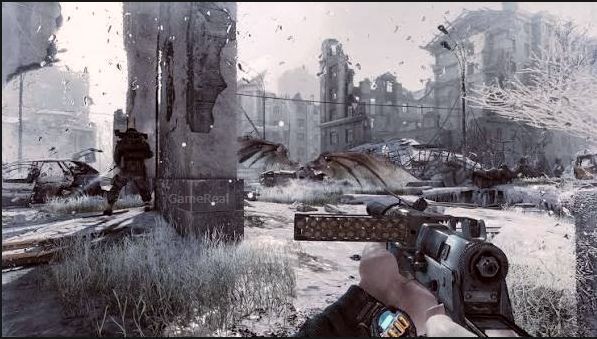
Metro Redux Next-Gen Update: Free Upgrade and Graphics Changes
The Metro Redux Next-Gen Update brings visual improvements, modern graphics features, performance options, and a substantial collection of bug fixes to Metro 2033 Redux and Metro: Last Light Redux. Released on PC on October 22, 2026, the update reaches PlayStation 5 and Xbox Series X|S on October 29. Existing owners of the supported editions can receive the upgrade for free, although compatibility depends on the version they own.
For returning players, the most important changes go beyond sharper textures. The update addresses longstanding technical problems involving high-resolution displays, crashes, save reliability, controller support, and progression-blocking bugs. PC players also receive support for modern upscaling technologies and uncapped frame rates, while console versions introduce platform-specific graphics and controller features.
There is one important distinction before downloading: this is a quality-of-life and technical upgrade, not a remake or a full remaster. The developers have improved the existing games rather than rebuilding them on a newer version of the 4A Engine. Ray tracing is not included.
Metro Redux Next-Gen Update Release Date and Platforms
The rollout is divided by platform and storefront.
- PC — October 22, 2026: The update launched for the Steam, Epic Games Store, and GOG versions.
- PlayStation 5 and PlayStation 5 Pro — October 29, 2026: The console upgrade brings native support for current PlayStation hardware and platform-specific features.
- Xbox Series X|S — October 29, 2026: The update adds support for current Xbox consoles, with graphics, audio, controller, and system-specific improvements.
- Microsoft Store on Windows — October 29, 2026: This version follows the later rollout rather than the October 22 launch used by the Steam, Epic, and GOG editions.
The publisher has also specified that the console editions in Japan are scheduled for November. Players in that region should check their local storefront for the applicable release date.
Nintendo Switch is not included in the announced Next-Gen Update. The upgrade currently covers supported PC, PlayStation, and Xbox editions.
The two games covered are Metro 2033 Redux and Metro: Last Light Redux. This is not an update for every game in the Metro franchise, so owners of Metro Exodus should not expect this particular patch to change their installation.
Is the Metro Redux Next-Gen Update Free?
Yes. The publisher describes the update as a free upgrade for existing owners of Metro 2033 Redux and Metro: Last Light Redux. You do not need to purchase a separate next-generation edition simply to receive the announced upgrade if your existing copy is eligible.
However, the publisher says that the free upgrade is available to most owners, not that every possible edition or purchase arrangement is guaranteed to qualify. Some versions may be incompatible.
Before troubleshooting a missing update, check which edition you own and which store or platform account is associated with it.
How to check for the update on PC
If you own the game through Steam, Epic Games Store, or GOG, open the launcher associated with your purchase and check the game’s download or update status.
- Open the launcher and locate Metro 2033 Redux or Metro: Last Light Redux in your library.
- Check whether an update is downloading, pending, or available.
- Allow the update to finish before launching the game.
- Start the game and check whether modern display resolutions and the updated graphics options are available.
- If the game still appears to be running an older build, check the launcher for pending downloads and consult the platform’s support information.
The Microsoft Store version follows the October 29 schedule. Do not assume its availability follows the same timing as the Steam, Epic, or GOG release.
On PlayStation 5 and Xbox Series X|S, check the relevant game library and storefront for the eligible upgrade. The exact process can depend on the edition and account under which the original game was purchased.
Important Microsoft Store save warning
Players upgrading the Microsoft Store version on Windows should pay particular attention to save compatibility.
The official patch notes state that save files will not carry over to the upgraded version and recommend starting a new game. Chapter Select will be unlocked, allowing players to choose chapters and begin with a default equipment set if they prefer.
This warning is specific to the Microsoft Store upgrade. Do not automatically assume that the same save-transfer limitation applies to every PC storefront or console edition.
If your progress is important, read the platform-specific guidance before switching versions. A free upgrade does not necessarily mean that existing save data will transfer unchanged.
What Has Changed in the Graphics?
The update introduces several technical improvements intended to make the older games work more effectively on modern hardware. These changes affect image quality, lighting, materials, animation, and available rendering options.
Higher-quality textures and geometry
Both games receive support for 4K textures, increased texture detail, and more detailed geometry. The update also improves physically based rendering materials, which influence how surfaces respond to light.
These changes are relevant to Metro’s environments, where concrete corridors, damaged buildings, equipment, weapons, and underground infrastructure contribute heavily to the atmosphere.
Higher-resolution textures can preserve more surface detail when viewed on a suitable display. Improved geometry can make some objects and surfaces appear more defined, while revised materials can change how light interacts with them.
The result is an improvement to the presentation of the existing environments rather than a redesign of their layouts, missions, or story content.
A 4K texture option does not mean every player will see the same result. Display resolution, graphics settings, hardware, and the way the game renders a scene all affect the final image.
Improved lighting and shadows
The official patch notes identify improvements to lighting and shadow quality, including fixes for missing volumetric lighting, broken shadows, pixelated bloom, and distracting white halos.
The developers also list fixes for flickering shadows, shimmering textures, unstable screen-space ambient occlusion, and broken post-processing on modern graphics hardware and ultrawide displays.
These fixes matter because lighting errors can affect both visual quality and atmosphere. A shadow that flickers, a bright halo around an object, or missing volumetric lighting can make a scene look inconsistent with its intended presentation.
Correcting those problems is different from simply increasing graphical detail. It can make the existing environments render more reliably, especially on systems and displays that previously exposed rendering issues.
The patch notes also list Screen Space Global Illumination among the PC graphics improvements. This adds another lighting technique to the updated rendering feature set.
Better animation and audio
Animation quality and sound quality have also been improved. The update includes spatial audio support, while console and controller features vary by platform.
Audio matters in Metro because environmental sounds, distant threats, dialogue, and combat contribute to how players interpret their surroundings. Spatial audio support can improve the way supported audio setups represent sound direction and space, but the actual experience depends on the platform, output device, and configuration.
The update should not be confused with a complete redesign of the soundscape. The documented changes concern quality improvements and technical support rather than a new story, new missions, or a wholly different audio system.
PC Graphics Features: DLSS, FSR, TSR, and Uncapped FPS
PC players receive a particularly broad set of rendering options. The official patch notes list uncapped frame rates, 4A TSR, NVIDIA DLSS, AMD FSR, Screen Space Global Illumination, increased geometry and texture detail, and spatial audio support.
Uncapped frame rates
The updated PC versions remove the previous frame-rate cap. Actual performance depends on the computer’s hardware, settings, and display.
An uncapped frame rate does not guarantee that the game will run at 120 frames per second or higher on every system. It simply removes the previous cap so that the game can render at a rate supported by the hardware and software configuration.
Players with high-refresh-rate monitors may benefit if their systems can consistently produce additional frames. On a less powerful computer, the achievable frame rate will still be limited by available processing and graphics performance.
NVIDIA DLSS and AMD FSR
The update adds support for modern upscaling options, including NVIDIA DLSS and AMD FSR. It also lists 4A TSR support.
Upscaling techniques reconstruct an image from a lower internal rendering resolution or use other methods to balance image quality and performance. Their precise behaviour depends on the technology, graphics hardware, and settings available.
These options give players more flexibility than a single fixed rendering path. Someone prioritising performance may choose a different setting from someone prioritising native-resolution image quality.
Support for a technology does not mean that every version of it is available on every graphics card. Players should use the options actually exposed by their hardware and game installation rather than assuming all systems have identical menus.
What should PC players check first?
After updating, start with the display resolution and graphics settings.
If the game launches at an unexpectedly low resolution, check the display options before assuming the monitor or graphics card is incompatible. The patch specifically addresses problems involving missing resolutions, fullscreen behaviour, stretched images, incorrect aspect ratios, and 4K monitors using display scaling.
If performance is lower than expected, compare settings under similar conditions and check whether an upscaling option is enabled. Do not assume that the most demanding graphics preset is automatically the best choice for every PC.
The patch notes also report improved stability on modern PC hardware, including Windows 11 systems, AMD GPUs, and high-refresh-rate displays. These are targeted fixes, not a guarantee that every launch or performance issue has been eliminated.
PlayStation 5 and Xbox Series X|S Enhancements
The console update introduces native support for PlayStation 5, PlayStation 5 Pro, and Xbox Series X|S, along with platform-specific rendering and controller features.
The publisher has described console output options of true 4K at 60 frames per second or upscaled 4K at 120 frames per second, with the higher-refresh-rate experience requiring suitable display hardware. These are announced output modes, not a promise that every configuration will use the same mode automatically.
PlayStation 5 and PlayStation 5 Pro
The PlayStation versions include support for DualSense Adaptive Triggers. This feature can provide varying resistance through the controller’s triggers where the game supports it.
PlayStation 5 Pro also receives PlayStation Spectral Super Resolution (PSSR) support. This is a platform-specific upscaling feature, so it should not be confused with the DLSS option available on supported NVIDIA hardware on PC.
The update also includes fixes for console stability and save-related problems. The official patch notes specifically mention a PlayStation 5 save-corruption issue that could make later chapters unavailable after the console had been powered off for an extended period and could reset inventory.
Xbox Series X|S
Xbox versions receive support for platform-specific graphics and audio features, including TSR upscaling and anti-aliasing support on Xbox Series X and spatial audio support on Xbox platforms.
Xbox controllers also receive Impulse Trigger support. The publisher lists Xbox Play Anywhere and Xbox handheld support among the wider platform improvements, while the patch notes include a power-optimised mode for Xbox Ally/X and the Microsoft Store version.
The update also addresses black screens after resuming from suspension, instability after Quick Resume, crashes, and graphical corruption on Xbox Series X|S.
These fixes are particularly relevant for players who regularly suspend and resume a game rather than fully closing it after every session.
The Update Fixes More Than Graphics
The patch notes contain a broad range of community-reported bug fixes. Some of the most useful changes address problems that could interrupt progress rather than merely affect presentation.
Stability and loading fixes
The update addresses crashes during chapter transitions, freezes during scripted sequences, hard freezes at startup screens, and infinite loading screens. It also fixes certain black-screen problems, including issues reported on newer AMD hardware and Xbox One X backward compatibility.
These fixes aim to make the games more reliable on modern configurations. They are particularly important for players returning to a campaign who previously encountered a crash that prevented them from continuing.
Save and checkpoint reliability
The patch notes list improvements to save reliability, cloud-save behaviour, and checkpoint loading. Steam Cloud upload problems are addressed, and the update includes fixes for save files disappearing, older checkpoints loading unexpectedly, and saves becoming corrupted after a crash or improper shutdown.
Another change prevents the game from creating a checkpoint when the player has too little gas-mask filter time remaining. Previously, such a checkpoint could leave the player suffocating before reaching another filter.
That is a meaningful gameplay fix because it addresses a situation where a checkpoint could trap the player in a repeated death loop instead of providing a safe recovery point.
Xbox Series X|S also receives improvements to save stability when resuming from Quick Resume or syncing cloud saves.
Gameplay and progression fixes
The update addresses a weapon reload bug that could leave the weapon stuck in an endless reload animation if the player interrupted the process of burning cobwebs by switching weapons or reloading.
It also fixes enemy detection behaviour in darkness and through walls, along with several game-specific progression problems.
In Metro 2033 Redux, fixes include issues involving the Demon encounter in Outpost, weapon collection at the beginning of the game, Khan’s sequence, the Library encounter, mechanisms in D6, the ending cutscene, toxic-area damage, and achievements.
In Metro: Last Light Redux, the patch fixes a problem with the bear encounter in The Garden, restores stealth knockouts and kills from the Revolution chapter onward, addresses a Venice armory crash involving the RPK, fixes a progression problem in the Khan DLC, and resolves an out-of-bounds issue in Nightfall.
These changes are useful for players who abandoned a playthrough because a mission stopped progressing or a specific encounter behaved incorrectly. They do not add new chapters; they correct problems in existing content.
Is the Next-Gen Update a Remaster or Remake?
No. The publisher explicitly describes the update as a quality-of-life upgrade rather than a remaster or remake.
That distinction helps set realistic expectations. The update improves textures, geometry, lighting, audio, performance options, controller support, and technical reliability, but the underlying games remain Metro 2033 Redux and Metro: Last Light Redux.
It also does not include ray tracing. The publisher says that adding ray tracing would require a deeper reworking of the rendering system and confirms that it is not part of this update.
Players looking for entirely redesigned environments, rewritten missions, or a new game built on a different engine should not interpret the Next-Gen label as confirmation of those changes.
Should You Install the Metro Redux Next-Gen Update?
For existing owners, the free upgrade is worth considering because it combines visual improvements with fixes for stability, controls, display compatibility, saves, and progression. PC players also gain more flexibility over rendering and frame rates, while console players receive features tailored to their hardware.
Before updating, check three things:
- Edition compatibility: Confirm that your existing copy is eligible for the free upgrade.
- Save compatibility: Pay special attention if you use the Microsoft Store version on Windows, because its saves will not carry over to the upgraded version.
- Hardware and settings: Choose graphics options appropriate for your display and system instead of assuming that 4K or uncapped frame rates are guaranteed on every device.
The Metro Redux Next-Gen Update is best understood as a modernisation of two existing games, not a replacement for them. Its strongest benefits are the combination of improved rendering, broader hardware support, and fixes for bugs that could previously interfere with a campaign. For returning players, that makes it a practical opportunity to revisit the original stories with fewer technical obstacles.