
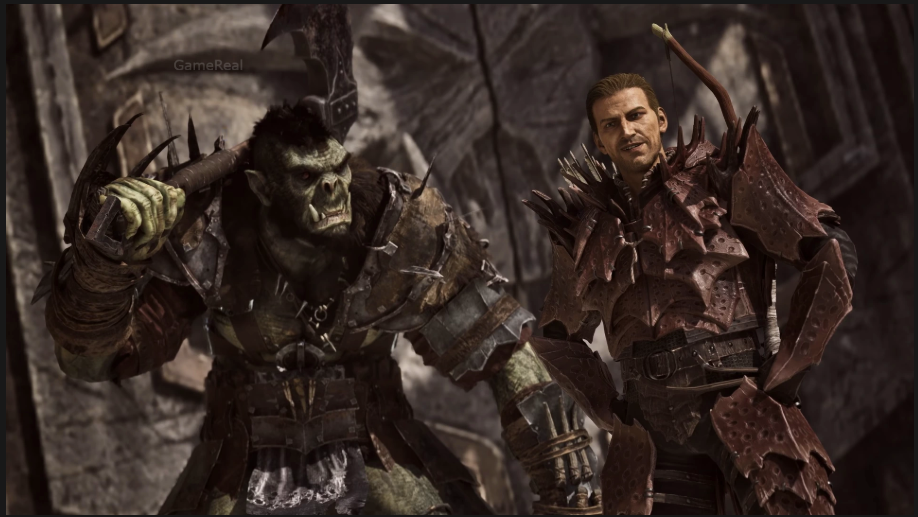
Gothic 1 Remake Update: Photo Mode, Marvin Mode and New Features
The Gothic 1 Remake has received its first major Feature Update, bringing two long-requested additions to the Valley of Mines: Photo Mode and Marvin Mode. Released on October 29, 2026, Feature Update #1 also introduces new character customisation options, additional Swamp Camp features, bench waiting and several gameplay improvements.
The update is particularly interesting for returning Gothic players because Marvin Mode brings back a familiar feature from the original series. It allows players to access additional game functions, including teleporting and spawning items, characters and creatures. Photo Mode, meanwhile, gives players a dedicated way to capture scenes from the Colony.
However, the update is not limited to these two headline features. Changes to crafted weapons, sound reactions, character behaviour and quest progression are also included. Some fixes address situations that could previously interrupt progression or cause particular interactions to behave incorrectly.
Here is a breakdown of what Feature Update #1 adds, how to activate its main features and which changes are worth knowing before returning to the game.
When Did Gothic 1 Remake Feature Update #1 Release?
THQ Nordic and Alkimia Interactive released Gothic 1 Remake Feature Update #1 on October 29, 2026.
The update is available free of charge to existing players on:
- PC
- PlayStation 5
- Xbox Series X|S
It adds Photo Mode, Marvin Mode, new customisation features and gameplay improvements. Players do not need to purchase a separate expansion to access the announced update features.
The release is also part of the developers’ post-launch support for the remake. Earlier announcements had identified Photo Mode, Marvin Mode, modding support and alternative progression mechanics as areas of future development. Feature Update #1 delivers the first two headline modes, while modding support has also begun through a separate release.
That distinction matters: the feature update and the mod kit are related developments, but they are not the same feature.
How to Activate Marvin Mode in Gothic 1 Remake
Marvin Mode is one of the most recognisable features associated with the original Gothic experience. In the remake, it returns as an official cheat mode that provides access to additional game functions.
Players can use it for activities such as opening difficult locks, teleporting around the world and spawning items, characters or creatures.
The activation process is straightforward.
Marvin Mode activation steps
- Open the game’s pause menu by pressing
Esc. - Type
MARVIN. - Press
Escagain. - Follow the instructions displayed by the game.
The activation sequence is:
Esc → MARVIN → Esc
Once activated, Marvin Mode provides access to its available additional functions.
The developers also provide a specific command for turning it off.
How to deactivate Marvin Mode
To deactivate Marvin Mode:
- Press
Esc. - Type
42.
The deactivation sequence is:
Esc → 42
This is worth remembering if you activate the mode temporarily and want to return to the standard gameplay experience.
What can you do with Marvin Mode?
The official announcement identifies several examples of what Marvin Mode allows players to do.
Opening difficult locks: Players can use the mode to get past certain locks they might otherwise struggle to open.
Teleporting: The mode provides teleportation functionality, allowing players to move around the game world in ways that are not part of ordinary exploration.
Spawning items: Players can spawn items rather than relying entirely on normal progression and item discovery.
Spawning characters and creatures: The mode also allows additional characters and creatures to be spawned.
These functions make Marvin Mode useful for more than simply bypassing a difficult encounter. Players interested in experimenting with the game world can use it to explore additional possibilities.
There is an important difference between using a cheat mode and completing the game normally, though. If you want to experience the intended progression, combat and exploration, it makes sense to keep Marvin Mode disabled during your main playthrough.
It can instead be useful for experimentation or revisiting particular situations after you have already experienced them normally.
The official announcement describes the available functions but does not provide a complete command-by-command list of every possible Marvin Mode operation. Players should therefore avoid relying on unofficial command lists as though every entry has been confirmed for this remake update.
Photo Mode: How to Open It
Photo Mode is the other major addition in Feature Update #1.
The Valley of Mines contains numerous environments, characters and locations that players may want to capture without interrupting their exploration to use external screenshot tools. The new mode provides a dedicated interface for taking in-game photographs.
There are two confirmed ways to open Photo Mode.
Method 1: Through the pause menu
- Press
Escto open the pause menu. - Select Photo Mode.
Method 2: Use the keyboard shortcut
Press L to activate Photo Mode.
The developers describe it as an extensive feature with various options for creating customised images. This gives players more control over how they capture scenes from the game.
Photo Mode is particularly useful for players who enjoy collecting screenshots, documenting their journeys through the Colony or sharing memorable locations with other members of the Gothic community.
It also provides another reason to revisit locations after completing their associated quests.
What should players expect from Photo Mode?
The official announcement confirms that Photo Mode includes multiple options for adjusting captured images. However, it does not provide a complete technical breakdown of every available setting.
For that reason, it would be inaccurate to promise specific camera controls, filters, depth-of-field settings, field-of-view adjustments or other options without checking them directly in the game.
The most reliable starting point is to open the mode using the pause menu or L and inspect the available controls in your own installation.
Photo Mode is a visual feature, not a gameplay progression system. Its main purpose is to give players more freedom when capturing the world.
New Haircuts and Tattoos for the Nameless Hero
Feature Update #1 also introduces additional appearance options for the Nameless Hero.
Previously, players had fewer ways to personalise the protagonist’s appearance. The new update allows the character to receive a proper haircut and tattoos.
These options are connected to quests involving two characters:
- Joru
- Baal Namib
According to the developers, players need to complete a few quests for these characters to unlock the new appearance options.
This is an important detail for anyone looking for the new customisation features immediately after updating. They are not simply presented as unrestricted options available from the start. Players need to progress through the relevant quests.
The addition also gives players another reason to interact with characters and activities associated with the Brotherhood.
For returning players, these customisation options offer a small but noticeable change to the protagonist’s appearance. They do not fundamentally alter combat or character progression, but they give players more control over how the Nameless Hero looks during the adventure.
New Swamp Camp Features and Brotherhood Immersion
The update also introduces a Brotherhood immersion and customisation feature for players who are members of the Swamp Camp.
This is separate from the general Photo Mode and Marvin Mode additions. It focuses on making membership in the Swamp Camp feel more connected to the player’s experience.
The official feature list confirms that the Brotherhood feature is available as part of the update, but does not provide a detailed breakdown of every activity or customisation option included in it.
It is therefore better to describe this as an additional faction-related feature rather than claim that it introduces a completely new questline or an extensive progression system.
For players who choose the Swamp Camp, the addition gives the faction another layer of interaction beyond its existing role in the story.
Waiting on Benches Is Now Available
Another smaller addition is the ability to wait while sitting on a bench.
This is a quality-of-life feature rather than a major gameplay system, but it adds another way for players to interact with the environment.
The official update list specifically identifies waiting while sitting on a bench as a new feature.
It is worth distinguishing this from a broader claim that every resting location or piece of furniture now supports waiting. The announcement confirms the bench feature, not universal waiting functionality across all environmental objects.
For players who enjoy the atmosphere of the Valley of Mines, this addition also makes the world feel a little more interactive.
Gameplay Improvements Beyond the New Modes
Feature Update #1 includes several improvements that are not immediately visible when opening Photo Mode or activating Marvin Mode.
These changes affect weapon statistics, sound reactions and character animations.
Crafted weapons receive improved stats
The developers have adjusted the statistics of crafted weapons.
This is relevant to players who invest time in crafting equipment rather than relying only on weapons found during exploration.
The announcement confirms improved stats, but does not provide a complete numerical before-and-after comparison for every affected weapon.
Players should therefore check their crafted equipment in the updated game instead of assuming that every weapon has received the same increase or that all crafting options have changed equally.
More sound reactions
The update adds more sound reactions.
This is an audio and presentation improvement intended to give the game additional responses during gameplay.
The official notes do not list every new reaction or identify every situation in which one can occur. It is best understood as a general improvement to the game’s sound feedback rather than a completely new audio system.
Improved water-death animation
A specific animation has been added for situations where the player dies in water after receiving damage.
This is a relatively focused visual improvement, but it makes the outcome of that situation more clearly represented through an appropriate animation.
It is one of the smaller changes in the update, although it demonstrates that the developers have worked on presentation details alongside the larger headline features.
Gothic 1 Remake Feature Update #1: Gameplay and Quest Fixes
Some of the most useful changes in the update are fixes to existing gameplay and quest behaviour.
These corrections matter because bugs involving equipment, journal entries, NPCs and quest progression can affect a player’s ability to complete activities normally.
Equipment and inventory fixes
The update addresses an issue that caused equipping two identical rings to behave incorrectly.
It also changes a logic check so that items in the player’s pouch are included.
These corrections are relevant to players who use multiple equipment pieces or carry important quest-related objects in their inventory.
The journal system has also received fixes for location and enemy entries that were not unlocking correctly.
Enemy equipment corrections
The developers have corrected equipment assignments for certain enemies.
Green Goblins can now have clubs and swords, while Goblin Warriors receive morning stars.
This is a specific enemy-related correction rather than a complete enemy combat overhaul.
Water Mages Robe vendor fix
Another correction addresses an issue that caused Saturas to sell the Water Mages Robe twice.
The change fixes the reported vendor behaviour. It should not be interpreted as a wider rework of Saturas or the game’s entire trading system.
Chapter-specific quest fixes
Several quest-related issues have also been addressed.
Chapter 1 – Aaron Chest
The developers fixed a blocker affecting the Aaron Chest quest when players solved it in an alternative order.
This is useful for players who approach objectives differently from the expected sequence. The correction addresses a situation where an alternative solution could previously create a progression problem.
Chapter 2 – The Minecrawler Nest
Gor Na Dun’s combat reaction during the trial in The Minecrawler Nest quest has been corrected.
This addresses a specific character-behaviour issue during that part of the quest.
Chapter 3 – Focus Stone Quest
The update adds fallback behaviour for Lester, Milten and Gorn when the player already possesses their focus stone before starting the focus quest.
This is an important progression correction because players who obtain an objective item earlier than expected can otherwise encounter problems with quest logic.
Chapter 4 – Golem Corpse Interaction
The update fixes interaction with golem corpses from different angles.
This addresses a specific interaction issue and should make those encounters less dependent on approaching the object from one particular position.
The developers have also fixed an issue that could prevent Urshak from appearing in the Ruined Castle after triggering the Find The Orc Shaman quest.
Chapter 6 – Mad Kalom
Mad Kalom’s combat behaviour, navigation and attacks have been polished for certain situations.
This is a targeted improvement to an existing encounter rather than confirmation of a complete redesign of the character’s combat system.
Taken together, these fixes make Feature Update #1 more substantial than a simple cosmetic addition. They address several different parts of the experience, from inventory logic and journal entries to chapter-specific progression problems.
Is Marvin Mode the Same as the Gothic 1 Remake Mod Kit?
No. Marvin Mode and the mod kit are separate features.
This distinction is particularly important because both developments have been discussed by the developers.
Marvin Mode is the official cheat mode included with Feature Update #1. It allows players to access additional game functions, such as teleporting and spawning items, characters and creatures.
The Mod Kit is a separate development tool intended to support player-created modifications.
On October 29, 2026, the Gothic 1 Remake team also announced the first stage of modding support through a Modkit Beta on Steam. Its initial focus is exposing the game’s scripting language and providing the full script sources.
The team also explained that players can access the mod management interface through a Steam launch option or by starting the game executable with the -ModManagementUI argument.
This is a separate release from the Photo Mode and Marvin Mode feature update.
The distinction matters because activating Marvin Mode does not give players the same tools as the mod kit. If your goal is to spawn objects or experiment with the game, Marvin Mode is the relevant feature. If you want to develop and install player-created modifications, the modding tools are the appropriate area to investigate.
The developers have also said that they have no estimated release date for additional mod tools, although they have more ideas for future support. Players should not assume that every planned modding feature is already available in the initial beta.
Is Gothic 1 Remake Feature Update #1 Free?
Yes. THQ Nordic confirms that Feature Update #1 is available free for Gothic 1 Remake players on PC, PlayStation 5 and Xbox Series X|S.
There is no separate purchase required for Photo Mode, Marvin Mode or the other features included in this update.
Players who already own the game should check their platform’s update process and install the latest available version.
The update is part of the existing game rather than a separately purchased expansion.
What Should Players Try First After Updating?
If you are returning to Gothic 1 Remake after installing Feature Update #1, the most useful starting point depends on what you want from the experience.
For players who want to capture screenshots: Open Photo Mode from the pause menu or press L. Explore the available options before taking screenshots so you understand what the mode offers.
For players who want to experiment: Activate Marvin Mode using Esc, type MARVIN, and press Esc again. Remember that Esc followed by 42 deactivates it.
For players interested in character appearance: Look for the relevant quests involving Joru and Baal Namib to unlock the new haircut and tattoo options.
For Swamp Camp members: Explore the Brotherhood immersion and customisation feature introduced with the update.
For players progressing through the story: Pay attention to the chapter-specific fixes, particularly if you previously encountered problems with Aaron Chest, The Minecrawler Nest, the focus stone quest or Urshak’s appearance.
This approach helps players find the additions that are most relevant to their current playthrough instead of treating the update as only a Photo Mode release.
Final Takeaway
Gothic 1 Remake Feature Update #1 adds more than two headline features. Photo Mode gives players a dedicated way to capture the Valley of Mines, while Marvin Mode restores an official cheat mode with functions such as teleportation and spawning items, characters and creatures.
The new haircut and tattoo options, Swamp Camp immersion feature and bench-waiting functionality add further variety. Meanwhile, weapon adjustments, additional sound reactions and chapter-specific quest fixes improve parts of the existing experience.
The key commands are simple: use Esc, type MARVIN, and press Esc again to activate Marvin Mode. To deactivate it, press Esc and type 42. Photo Mode can be opened from the pause menu or with the L key.
Players interested in creating their own modifications should also remember that the separate Modkit Beta is not the same thing as Marvin Mode. Both developments expand what players can do with the remake, but they serve different purposes.
For existing owners, Feature Update #1 is a free addition that makes the game more flexible for exploration, experimentation and revisiting the Colony.