
Cyberpunk 2077 Update 2.5: New Features and How to Unlock Them
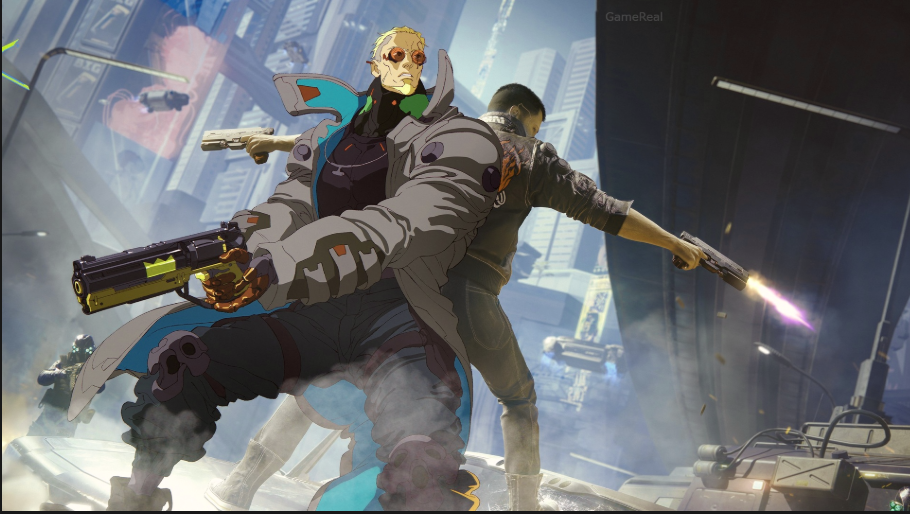
Cyberpunk 2077 Update 2.5, officially called the Edgerunners 2 Update, brings new quests, collectible rewards, clothing, cyberware customization, dual-wielding combat and in-game mod support to Night City. Released as a free update scheduled for October 22, 2026, it also introduces technical improvements and quality-of-life changes.
The most useful additions are not all unlocked in the same way. Some require completing main-story missions or reaching a Street Cred milestone, while others are available through clothing vendors, new map markers, Photo Mode or the mod menu.
Here is what Update 2.5 adds, how to access its main features and which limitations to understand before changing your character or save file.
Cyberpunk 2077 Update 2.5: Release Date and Platforms
CD Projekt RED announced the official patch notes on October 21, 2026. The update is scheduled to arrive first on PC, Mac through Steam, GOG and the Epic Games Store, PlayStation 5, and Xbox Series X|S on October 22.
Nintendo Switch 2 and the Mac App Store version are scheduled to receive the update in the following days. If the update does not appear on your platform immediately, check the game’s update status rather than assuming your installation is broken.
The patch is free for players who already own the game on a supported platform.
1. How to Unlock the Clampdown Quest and King Gear Set
One of Update 2.5’s main additions is Clampdown, a new side quest set before the events of Cyberpunk: Edgerunners 2. Completing it also provides access to a five-piece gear set based on the character King.
Requirements to unlock Clampdown
Follow these steps:
- Progress through the main story until you have completed The Heist.
- Complete two gigs for Wakako Okada.
- Wait for Wakako to send you a message.
- Check your journal for the newly available side quest and follow its objectives.
The important requirement is completing two Wakako gigs after satisfying the main-story prerequisite. If the quest does not appear, check your completed jobs and messages before repeating unrelated activities.
How to get the King gear set
The five-piece King gear set is obtained during the Clampdown side quest. If you want the set, complete the mission rather than stopping after unlocking it.
The official patch notes confirm the gear set and its connection to the quest, but do not establish that every piece can be obtained separately from another vendor. Treat the mission as the confirmed route.
New radio station: HKGN 102.0 FM
Update 2.5 also adds HKGN 102.0 FM, a radio station featuring music from the Cyberpunk: Edgerunners series.
This is a listening option rather than a quest reward. Once the update is installed, look for the station in the game’s radio selection. It gives players another way to hear music associated with the animated series while exploring or driving around Night City.
2. How to Unlock Welcome to Paradise
Welcome to Paradise is another new side quest. It takes V on a guided tour of Night City narrated by Richard Night while uncovering a mystery.
Unlike Clampdown, its requirements are straightforward.
Unlock requirements
You must:
- Complete The Heist.
- Reach 15 Street Cred.
Once both requirements are satisfied, check your journal and available jobs for the quest.
Street Cred is separate from V’s character level. If you have completed The Heist but have not reached 15 Street Cred, continue earning Street Cred through activities such as gigs and other jobs until you meet the requirement.
This distinction matters because gaining character levels alone does not satisfy the stated Street Cred requirement.
The quest’s guided-tour format also makes it different from Clampdown: the latter is tied to Wakako’s gigs and the King gear set, while Welcome to Paradise focuses on exploring the city and following a mystery.
3. How to Customize Hand Cyberware at Glamdocs
Update 2.5 adds visual customization for four types of hand or arm cyberware:
- Mantis Blades
- Gorilla Arms
- Monowire
- Projectile Launch System
You can change the appearance of these implants without treating the new feature as a replacement for the cyberware itself.
How to find a Glamdoc
- Make sure Update 2.5 is installed.
- Equip the relevant cyberware: Mantis Blades, Gorilla Arms, Monowire or Projectile Launch System.
- Open the map and look for the new Glamdoc markers, identified by a spray-paint icon.
- Visit one of the five Glamdocs.
- Browse that character’s available cyberware skins and customize the colors offered.
Each Glamdoc operates from a unique shop and has an individual catalog. The locations also include their own introductory scenes with voice acting and animations.
That means the five locations are worth exploring if you want to see the different cosmetic options. However, do not assume that every Glamdoc offers identical skins: the developer specifically describes the catalogs as unique.
Does this change cyberware functionality?
The announced feature is focused on appearance. It lets you give supported implants a different visual style, with customizable colors, rather than announcing a new cyberware class or a general upgrade to combat statistics.
If your goal is to change how an implant looks, visit a Glamdoc. If you want to change its gameplay performance, use the game’s existing cyberware and character-build systems instead.
4. How to Unlock Dual-Wielding Pistols and Revolvers
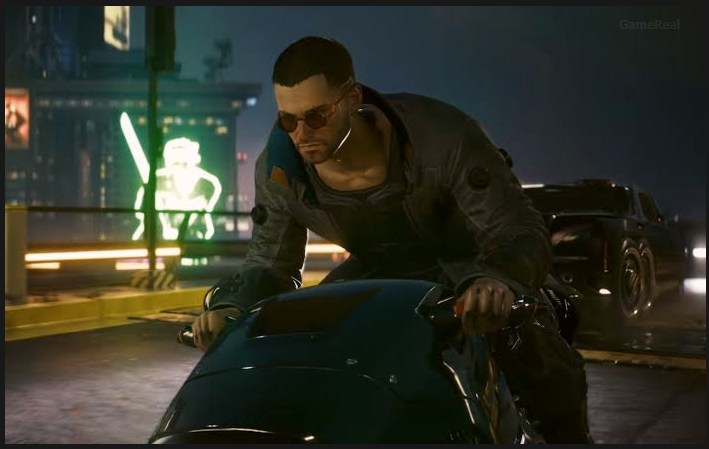
Update 2.5 introduces Double Trouble, a new perk in the Cool attribute tree. It enables a new dual-wielding playstyle using eligible Power-category pistols and revolvers.
The update also adds four auxiliary perks connected to the new playstyle.
How to access Double Trouble
- Install Update 2.5.
- Open your character’s perk menu.
- Navigate to the Cool attribute tree.
- Locate the new Double Trouble perk.
- Review its requirements and available supporting perks before committing to the build.
The important limitation is weapon category. The developer specifies Power-category pistols and revolvers; this does not mean every handgun, Smart weapon or Tech weapon can be dual-wielded.
If you are planning a new build around the feature, inspect the weapon category and perk description rather than assuming that any two pistols will work.
Who benefits most from this feature?
Players who want a firearm-focused build have a new option to explore, particularly if they already invest in Cool. The four auxiliary perks also provide additional ways to support the playstyle.
However, the patch announcement does not provide enough evidence to declare dual-wielding universally stronger than existing builds. Its value will depend on your weapon choices, perk allocation and preferred combat style.
5. Where to Find the New Clothing Sets
Update 2.5 introduces five new outfit sets that can be purchased from selected clothing vendors across Night City. The official patch notes identify these district and vendor-brand locations:
| Clothing brand | Districts to check |
|---|---|
| Maxiwear | Heywood, Arroyo and Little China |
| Jinguji | City Center |
| NetWatch | Kabuki and Japantown |
| IconAmerica | Pacifica, Badlands and Northside |
The developer also says another outfit set will reach Night City shops later. Its availability should not be treated as immediate unless a subsequent announcement confirms it.
NUS Infiltrator clothing set
The NUS Infiltrator set is also available for purchase from clothing vendors in Kabuki and Japantown.
If you are collecting outfits, check the listed districts instead of travelling randomly around the map. The patch notes establish where the relevant vendors can be found, but do not guarantee that every outfit will be available at every vendor within a district.
Prices and any additional purchase requirements should be checked in-game.
New hairstyles for V
Some hairstyles that were previously exclusive to non-player characters are now available for V.
There is one limitation: some styles are restricted to feminine or masculine body types. If you cannot find a particular hairstyle in the character customization menu, check whether it is compatible with your selected body type before assuming the update is missing.
6. How to Find the New Minor Arcana Tarot Cards
Update 2.5 adds 12 Minor Arcana Tarot Cards across Night City and expands the existing Tarot collection system.
The new cards are tied to an extension of the Fool on the Hill quest.
How to start the Tarot quest
- Install the update.
- Explore Night City and locate one of the new Minor Arcana cards.
- Scan any one of the new cards.
- Check the journal for the new quest.
- Continue searching for the remaining cards.
- Collect all 12 to obtain the special reward described by the developer.
You do not need to find all 12 before the quest activates. Scanning any one of the new cards starts the quest, so the first discovery is the key step.
The Tarot menu also separates Major and Minor Arcana into different sections, making the expanded collection easier to track.
The official announcement confirms the total number of cards and the reward for collecting them all, but does not identify the reward in its summary. Check the in-game quest and reward information rather than relying on unverified claims about what it contains.
7. How to Install Mods Through the In-Game Menu
One of the most significant changes in Update 2.5 is cross-platform mod support powered by mod.io.
The feature lets players browse and install a selection of player-created mods directly through the game’s in-game menu. It is available on PC, Mac, PlayStation 5, PlayStation 5 Pro, Xbox Series X|S and Nintendo Switch 2, with platform update timing still relevant to the rollout.
How to access the new mod support
- Confirm that your platform has received Update 2.5.
- Launch Cyberpunk 2077 and open the relevant in-game mod menu.
- Browse the available player-created mods.
- Read each mod’s description and requirements before installing it.
- Install a selection that suits your preferences and check the game’s save status.
The developer describes this as the first step toward cross-platform modding. The initial selection is not necessarily the complete catalog: more mods are expected to become available over time.
Important warning about console achievements and trophies
On consoles, achievements and trophies cannot be earned while playing from a modded save file. The game marks modded saves with a dedicated icon in the Load Game menu.
If you want to keep earning achievements or trophies, be careful about which save you use. Consider maintaining a separate unmodded playthrough rather than assuming that disabling a mod later will automatically restore achievement eligibility to a previously modded save.
This restriction is especially important for players who want to experiment with mods but are also working toward a completion goal.
8. Other Quality-of-Life Improvements
Several smaller changes make managing a playthrough more convenient.
Saves grouped by playthrough
The Load Game menu now groups saves by separate playthroughs. This should make it easier to distinguish different runs when you have multiple characters or alternate builds.
Item filters for stashes
Item filters have been added to apartment and vehicle stashes. Players who keep a large inventory can use the new filtering options to find stored equipment more easily.
Console field-of-view slider
Update 2.5 adds a field-of-view (FOV) slider on consoles. This allows players to adjust how much of the environment is visible in the first-person camera.
A wider FOV may help some players prefer the camera perspective, but the best setting is personal. Adjust it gradually to find a comfortable view rather than assuming the maximum value is ideal for every display.
Graphics and performance changes
The update includes several technical additions and refinements:
- DLSS 4.5 support, including up to 6X Multi Frame Generation or Dynamic Multi Frame Generation and the second-generation Transformer Model.
- Glasses-free 3D effects on compatible Samsung Odyssey 3D monitors, alongside a Motion Comfort setting.
- MetalFX Frame Interpolation support.
- A toggle for FSR Anti-Lag 2 in settings.
- Performance optimizations, including improvements for ray tracing and PlayStation 5 Pro.
- Improved HDR rendering for more accurate colors, brightness and contrast on compatible displays.
The AMD FSR options have also changed: FSR 3 upscaling is no longer included, while FSR 2.1, FSR 4 and FSR 3.1 Frame Generation remain available.
These are not universal performance guarantees. The benefit of individual graphics technologies depends on compatible hardware, platform support and settings. In particular, DLSS features apply to supported NVIDIA hardware, while MetalFX features concern the Mac version. Check the options available on your own system before changing settings.
9. Photo Mode and Twitch Drops
Update 2.5 adds frames inspired by the Cyberpunk Trading Card Game to Photo Mode, along with new poses designed to show off dual-wielding.
These are creative tools rather than combat upgrades. Players who make screenshots or character portraits can use the new frames and poses to give images a card-like presentation.
The patch notes also confirm four new TWINTONE skins for the Quadra Turbo-R V-Tech through Twitch Drops. These are reward-based cosmetics rather than items confirmed to be available through ordinary clothing vendors.
Because Twitch Drop eligibility and campaign timing can change, check the current official reward information before spending time watching streams. Do not assume the skins are permanently claimable or that every stream automatically qualifies.
10. Bug Fixes Included in Update 2.5
The update also addresses a range of issues, including:
- A Nintendo Switch 2 save error that could report insufficient storage space.
- HDR settings on PlayStation 5 that previously had no effect.
- A quest-progression issue in Things Done Changed where the Delamain cab could become stuck after colliding with another vehicle.
- Film Grain settings that did not work as expected.
- An issue where tagging enemies during scanning could cause V to crouch or stand with certain control schemes.
- Missing controller settings for the Third-Person Camera.
- Several localization typos and other issues affecting features and content introduced since Patch 2.1.
These fixes matter most to players who encountered the affected problems. They should not be interpreted as proof that every technical issue in the game has been resolved.
What Should You Do First After Updating?
Your best first step depends on what you want from Night City:
- Want the new King gear? Complete The Heist, finish two Wakako gigs and wait for the Clampdown message.
- Want the guided tour? Complete The Heist and reach 15 Street Cred to unlock Welcome to Paradise.
- Want different cyberware visuals? Find the five Glamdocs using their spray-paint map markers.
- Want to dual-wield? Open the Cool perk tree and check Double Trouble and its supporting perks.
- Collecting cosmetics? Visit the listed clothing districts and check the Twitch Drops requirements for the vehicle skins.
- Want to try mods? Browse the in-game mod menu, but remember that modded console saves cannot earn achievements or trophies.
- Want a cleaner inventory? Try the new stash filters and playthrough-based save grouping.
Cyberpunk 2077 Update 2.5 adds a mixture of story content, combat options, customization, mods and technical improvements. The most useful approach is to start with the features that match your current playthrough, then explore the optional content as its requirements become available. Check your platform’s update status and the in-game menus for the features actually available in your installation.