
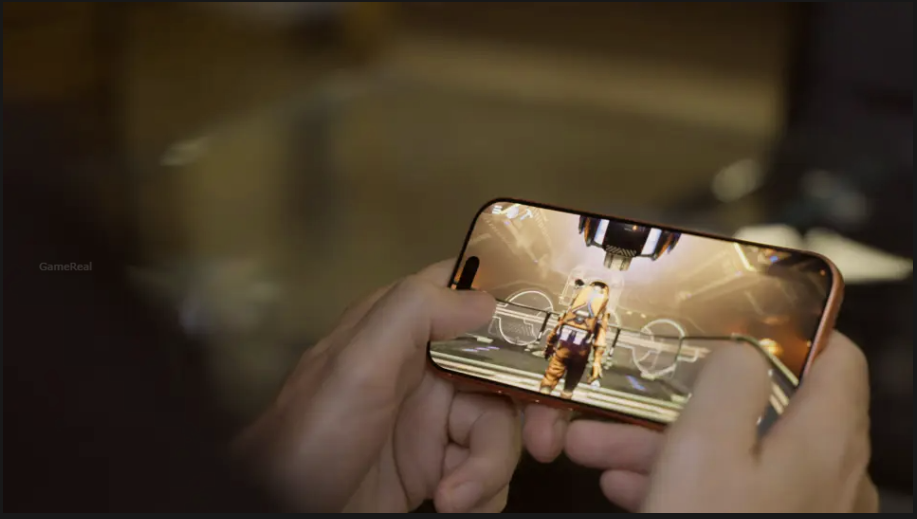
No Man’s Sky on iPhone: Compatible Devices, Storage and Missing Features
No Man’s Sky is now available on compatible iPhones, bringing Hello Games’ space exploration game to Apple’s mobile platform. However, the iOS version is not simply a smaller download of the console or PC release. Device compatibility, available storage, purchase requirements and missing features all matter before you install it.
The most important thing to check is whether your iPhone or iPad meets the actual compatibility requirements. Even if your device can install other demanding mobile games, that does not automatically mean it can run No Man’s Sky.
There are also limitations worth understanding before purchasing the full game. The iOS release does not include multiplayer, and some features have device restrictions. Cross-save support with other platforms should not be assumed either.
This guide explains the supported devices, iOS requirements, download size, free trial, full-game purchase and the important differences between the mobile version and other editions.
Is No Man’s Sky available on iPhone?
Yes. Hello Games released No Man’s Sky for iPhone and iPad on October 28, 2026. The mobile launch arrived alongside the FORSAKEN update, rather than shipping with an older version of the game.
The studio says the iOS release includes more than 40 major updates, including FORSAKEN. That means mobile players are not receiving a separate introductory edition with only a small selection of the game’s content. The free trial is an opportunity to try the opening portion; unlocking the full game is a separate one-time purchase.
FORSAKEN itself adds a darker exploration theme, with haunted technology, biological horrors and unusual locations to investigate. Its arrival on the same day as the iOS release means new mobile players can begin with the current update rather than waiting for the latest content to reach the platform.
There is one important distinction: having the same major updates does not mean every platform has identical features. Some systems and gameplay options are restricted or absent on iOS, so the version number alone does not tell the whole story.
iPhone and iPad compatibility: check the exact model
Before downloading the game, check both your device model and operating-system version. The App Store listing currently requires iOS 26.0 or later and an A12 Bionic chip or newer. Hello Games’ launch announcement describes the supported range as iPhone 11 and newer, and third-generation iPad Air and newer.
However, the store’s compatibility information and the studio’s broad device description do not line up perfectly. The US App Store listing includes some older iPhone models, including the iPhone XS, XS Max and XR, while Hello Games’ announcement highlights iPhone 11 as the starting point.
That discrepancy is a good reason not to rely on a general statement such as “A12 devices are supported” or assume that every older device will work. Apple’s compatibility check for your specific device is the more useful final step.
What to check on your iPhone
-
Open the App Store on the iPhone you intend to use.
-
Search for No Man’s Sky and make sure the developer is listed as Hello Games.
-
Open the game’s product page and find the Compatibility section.
-
Check whether your exact iPhone model is listed.
-
Confirm that your device is running iOS 26.0 or a later compatible version.
If the App Store says the game is incompatible, do not assume that installing a newer operating-system update will solve the problem. Compatibility also depends on the device hardware.
What about iPad?
No Man’s Sky is also available for compatible iPads. Hello Games identifies third-generation iPad Air models and newer as supported, while the App Store provides its own device-specific compatibility list and operating-system requirement.
Because the wording differs between the announcement and the store listing, iPad owners should check their exact model on the App Store rather than relying only on the iPad Air generation.
No Man’s Sky download size and storage requirements
The App Store lists No Man’s Sky at 3.8 GB. Hello Games describes the mobile release as a single download of approximately 4 GB. These figures are broadly consistent: one is a precise store listing, while the other is the developer’s rounded description.
The relatively small download is notable for a game built around a huge universe of planets, creatures and star systems. Hello Games explains that the game generates its universe on the device while players explore. This is different from downloading every possible planet and location as separate content.
Still, the listed app size should not be treated as a promise that exactly 3.8 GB of free space will always be enough for installation and continued use.
How much free space should you keep?
The 3.8 GB figure is the store’s listed app size, not a guarantee of the total space the game will occupy in every situation. Installation processes, temporary files and future updates can affect the amount of free storage needed.
Before installing:
-
Check the available storage in your iPhone or iPad settings.
-
Keep more free space than the listed download size where possible.
-
Avoid starting a large download when the device is almost full.
-
Recheck storage if an update fails or the App Store reports insufficient space.
If your device has only a small amount of free storage, remove or offload files you no longer need before installing. This is more reliable than assuming the App Store’s download-size figure represents the complete storage requirement.
What features are missing from the iPhone version?
The iOS release includes a substantial amount of No Man’s Sky content, but there are two limitations that players should understand before starting a long-term save: multiplayer is not supported, and planetary settlements have a hardware restriction.
These are not minor details for every player. Someone who mainly enjoys solo exploration may be comfortable with the mobile version, while a player who regularly joins friends or manages settlements needs to consider the differences carefully.
1. Multiplayer is not supported
Hello Games explicitly confirms that multiplayer is not supported on iOS. You should therefore approach the iPhone version as a solo experience rather than expecting the same shared-world features available on supported PC and console versions.
This matters if you usually play No Man’s Sky with friends, visit another player’s base, or use multiplayer activities as a central part of your progression.
The absence of multiplayer does not mean the entire game is missing. Exploration, survival, crafting and other major parts of the experience remain available. However, the social side of the game is a significant difference.
If playing together is your main reason for returning to No Man’s Sky, check the supported PC or console editions instead.
2. Planetary Settlements require newer iPhones
Planetary Settlements are supported on iPhone 15 Pro and newer models, according to Hello Games.
This is a separate restriction from basic game compatibility. An iPhone may be capable of running No Man’s Sky but still not support the settlement feature.
For example, an iPhone 11 may meet the studio’s stated starting point for running the game, but it does not meet the iPhone 15 Pro requirement for planetary settlements.
That distinction is particularly important for players planning to spend a long time building and managing their universe. Do not confuse the minimum supported device with the hardware required for every feature.
3. Cross-save with PC and consoles is not confirmed for iOS
No Man’s Sky has an official cross-save system covering platforms such as PC, PlayStation, Xbox, Nintendo Switch and Mac. However, iOS is not included in the platform list on Hello Games’ cross-save information page.
That means you should not assume that an existing PC or console save can be transferred to an iPhone, or that mobile progress can automatically be continued on another platform.
The distinction here is important: the official platform list does not establish that iOS cross-save is permanently impossible. It simply does not confirm iOS support.
If you already have hundreds of hours invested in another version, treat the iPhone release as a separate experience unless Hello Games announces mobile cross-save compatibility.
Touch controls, controllers and playing on a larger screen
A game like No Man’s Sky has more control requirements than a typical mobile action game. Players move around planets, pilot spacecraft, manage inventories, collect resources, build structures and interact with different vehicles.
Hello Games says it rebuilt the touch controls specifically for mobile rather than simply shrinking the existing interface.
The studio also confirms support for external controllers and casting to a television. On iPad, players can use a mouse and keyboard as well.
These options make the mobile release more flexible than a touchscreen-only game.
Is a controller supported?
Yes. Hello Games confirms controller support. This is useful if you prefer physical buttons and analogue sticks for movement and flight.
A controller may also make longer sessions more comfortable, especially when switching between exploration and spacecraft controls. However, the exact experience can depend on the controller and the device being used.
If you already own a compatible controller, you can check whether it works with your iPhone before purchasing the full game.
Can you play on a TV?
Hello Games also mentions casting to a television. This gives players another way to use the mobile version beyond looking at a small phone display.
Casting support should not be confused with multiplayer or a separate console release. It is a display option for the mobile game, not confirmation that the iOS version has every feature available on a console.
Can you use a keyboard and mouse?
The studio specifically identifies mouse-and-keyboard support for iPad. This is worth knowing if you prefer a more traditional control setup on a tablet.
Do not automatically assume that every keyboard and mouse combination will work identically across iPhone and iPad. The studio’s announcement specifically calls out iPad support.
Does No Man’s Sky on iPhone include the full game?
Hello Games describes the iOS release as the full No Man’s Sky experience, with more than 40 major updates included. The FORSAKEN update also arrived on the mobile platform at launch.
That is an important distinction from a mobile spin-off or a simplified introductory version. Players can explore the game’s universe and access a substantial collection of content that has been added over the years.
The included updates matter because No Man’s Sky has changed considerably since its original release. Its content has expanded through major additions and improvements, rather than remaining limited to the experience available at launch.
However, “full game” should be understood in the context of the platform. It does not mean that iOS has identical feature availability to every other version. Multiplayer and the device restriction on planetary settlements are clear examples of that difference.
What does the FORSAKEN update add?
FORSAKEN arrived on October 28, 2026, alongside the iPhone and iPad release.
The update focuses on a darker side of the universe. Players can search for rare haunted technology and biological horrors in locations such as derelict hulks, abandoned freighters, planetary dig sites and infested outposts.
It also introduces unusual traders interested in collecting these discoveries.
One additional feature is seamless warping to nearby stars. Players can lock onto bright stars in the sky and travel towards them without first opening the galactic map.
For new mobile players, this means the game launches with the latest major update rather than requiring them to wait for a separate mobile content release.
Is No Man’s Sky free on iPhone?
No Man’s Sky is free to try, but the full game requires a one-time purchase.
The App Store describes the model as “Try Before You Buy.” Players can experience the beginning of the game without paying upfront. A full-game unlock then provides access to the complete experience and its included updates.
This is different from a subscription-based mobile game or a free-to-play title built around repeated in-app purchases.
The US App Store listing identifies a full-game unlock, but prices can vary between regional storefronts. Players in India should check the price displayed in their own App Store before purchasing rather than relying on a price shown for another country.
How to try the game before buying
-
Open the App Store on a compatible iPhone or iPad.
-
Search for No Man’s Sky and verify that Hello Games is the developer.
-
Check the Compatibility section for your device.
-
Download the game if the listing allows installation.
-
Start the free opening portion and see whether the controls and performance suit your device.
-
If you want to continue beyond the trial, review the full-game unlock price shown in your regional store.
The free trial is particularly useful because device performance can vary. A compatible phone is not automatically guaranteed to deliver the same experience as a newer model.
Trying the opening section first gives you an opportunity to assess the controls and general performance before spending money.
Battery life, heat and performance expectations
Running a large exploration game on a phone creates different challenges from running it on a desktop PC or console. The device must handle the game’s environment generation, graphics, controls and other processing while operating within mobile power and thermal limits.
Hello Games says it worked on battery life and thermals during the iOS conversion. The studio also highlights the game’s runtime universe generation as one reason it could keep the download relatively small.
These are useful technical details, but they should not be interpreted as a guarantee that every supported iPhone will remain cool or deliver identical performance.
Actual battery consumption and temperature can depend on several factors:
-
The iPhone model and its hardware.
-
Battery condition and current charge.
-
Screen brightness.
-
Ambient temperature.
-
Background applications.
-
Length of the gaming session.
A newer device may have more performance headroom than an older supported model, but the studio’s compatibility announcement does not provide a complete model-by-model performance comparison.
Practical tips before a long session
Keep your device updated and close unnecessary background applications if you are experiencing performance problems. Avoid playing in direct sunlight or in an already hot environment.
If the phone becomes noticeably warm, take a break and allow it to cool down. Lowering screen brightness can also help reduce power consumption.
These are general mobile-device precautions, not a claim that a particular setting has been tested to improve No Man’s Sky performance.
What should existing PC and console players know?
If you already play No Man’s Sky on PC, PlayStation, Xbox or Nintendo Switch, the iPhone version may be attractive as a portable way to explore the universe.
However, there are a few questions to consider before treating it as a replacement for your existing version.
Your existing save: iOS is not currently listed among the platforms on the official cross-save information page. Do not purchase the mobile version expecting your existing save to appear automatically.
Playing with friends: Multiplayer is not supported on iOS, so the mobile edition is not a direct substitute for a multiplayer session on another platform.
Settlement progression: Planetary Settlements require an iPhone 15 Pro or newer. Players using older supported iPhones should account for this limitation.
Controls: The mobile version supports redesigned touch controls, external controllers and TV casting. iPad also supports mouse and keyboard.
Content: More than 40 major updates are included, with FORSAKEN available from the mobile launch.
For players who mainly want solo exploration while travelling, these trade-offs may be acceptable. For players who depend on multiplayer or cross-platform save continuity, the current limitations are more significant.
Frequently asked questions
Can I play No Man’s Sky on an iPhone 11?
Hello Games identifies iPhone 11 and newer as its supported starting range. The App Store also has its own device-specific compatibility information, so check the listing for your exact model and iOS version before downloading.
Does No Man’s Sky require iOS 26?
The current US App Store listing specifies iOS 26.0 or later and an A12 Bionic chip or newer. Check your regional listing because its compatibility information is the final reference for your device.
How many GB does No Man’s Sky need on iPhone?
The App Store lists the app at 3.8 GB. Hello Games describes it as a download of approximately 4 GB. Keep additional free space available because the listed app size does not guarantee the total space required for installation and future updates.
Is No Man’s Sky multiplayer available on iPhone?
No. Hello Games explicitly states that multiplayer is not supported on iOS.
Can I build planetary settlements on every supported iPhone?
No. Hello Games says planetary settlements are supported on iPhone 15 Pro and newer models. Basic game compatibility does not guarantee settlement support.
Does No Man’s Sky on iPhone include the FORSAKEN update?
Yes. Hello Games confirmed that the iOS release includes more than 40 major updates, including FORSAKEN from day one.
Can I transfer my PC save to the iPhone version?
Do not assume that you can. The official cross-save platform list includes PC, PlayStation, Xbox, Nintendo Switch and Mac, but does not list iOS.
Can I play No Man’s Sky on iPhone with a controller?
Yes. Hello Games confirms external controller support, alongside redesigned touchscreen controls.
Is the full iPhone version free?
Only the opening portion is free to try. A one-time purchase is required to unlock the full game. The price depends on your regional App Store listing.
Is No Man’s Sky available on Android?
The official announcement and store information covered in this guide concern the iPhone and iPad release. They do not establish an Android release. Do not assume that an Android version is available based on the iOS launch.
Should you download No Man’s Sky on iPhone?
No Man’s Sky on iPhone is a substantial mobile release, not merely a small spin-off. It includes more than 40 major updates, launches with FORSAKEN, supports redesigned touch controls and offers a free opening section before the full-game purchase.
The most important considerations are the device requirements and the platform limitations. Check your exact model and iOS version, keep additional storage available, and remember that multiplayer is unavailable. Planetary Settlements also require an iPhone 15 Pro or newer, while cross-save support for iOS has not been confirmed by the official platform list.
For players who want solo exploration on a compatible Apple device, the free trial provides a sensible way to evaluate the experience before paying. Existing PC and console players should be more cautious if they expect multiplayer or access to their established save files.