
BlizzCon 2026 Free Rewards: How to Claim Them
BlizzCon 2026 isn’t just about new game announcements and big reveals. Blizzard is also giving players several opportunities to pick up in-game rewards during the celebration.
The good news is that some of these rewards are genuinely free.
The confusing part is that not every BlizzCon 2026 reward is free. Blizzard has separate rewards for players who simply claim promotional items, viewers who watch eligible World of Warcraft content, and customers who purchase the BlizzCon Digital Bundles or Ultimate Collection.
That distinction is important if you’re searching for free BlizzCon items.
You don’t need to buy a Digital Bundle just to claim the two free rewards available through the Battle.net Shop. World of Warcraft players also have a separate viewing-reward campaign that can provide several additional items, including Trader’s Tender, a housing decoration, a mount, and a toy.
In this guide, we’ll explain what’s free, how the viewing rewards work, what accounts need to be connected, which deadlines matter, and what to do if a reward doesn’t appear immediately.
What Free BlizzCon 2026 Rewards Can You Claim?
Blizzard has confirmed two free in-game rewards that players can claim through the Battle.net Shop without making a purchase.
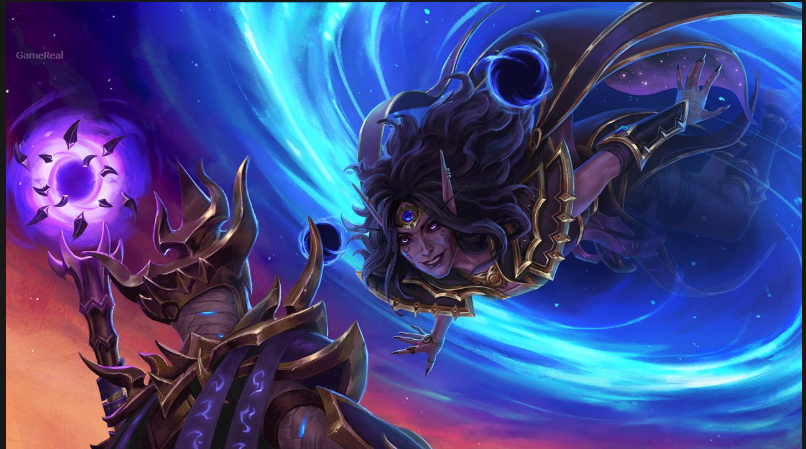
The first is Fix It Gear Head Thrall for Heroes of the Storm.
The second is a 15-day Co-op XP Boost for StarCraft II.
These two rewards are available for a limited time and are scheduled to remain available through September 28, 2026.
There is no need to purchase the BlizzCon Digital Bundles to get these two promotional rewards.
That makes them the simplest BlizzCon 2026 rewards to claim.
If you play Heroes of the Storm or StarCraft II, it’s worth checking the Battle.net Shop before the deadline rather than assuming the rewards will remain permanently available.
How to Claim the Free BlizzCon 2026 Rewards
Claiming the free rewards is straightforward, but make sure you’re signed into the correct Battle.net account first.
Step 1: Sign in to Battle.net
Open the Battle.net client or website and sign in to the account you use for Blizzard games.
If you have multiple Battle.net accounts, double-check which one you’re using.
This is especially important if you have created more than one account over the years.
Step 2: Open the Battle.net Shop
Look for the BlizzCon 2026 promotional section.
The free rewards are separate from the paid Digital Bundles, so don’t assume that you need to buy one of the bundles.
Step 3: Select the free reward
Look for the eligible Heroes of the Storm and StarCraft II rewards.
Heroes of the Storm players can claim Fix It Gear Head Thrall.
StarCraft II players can claim the 15-day Co-op XP Boost.
Step 4: Complete the claim
Follow the instructions shown for the promotion and confirm the reward on your Battle.net account.
Step 5: Launch the game
After claiming, open the relevant game and check that the reward has been delivered.
If the item doesn’t appear immediately, don’t repeatedly claim the same promotion or make unnecessary account changes.
Some promotional rewards can take time to process.
The important thing is to make the claim before the September 28, 2026 deadline.
Are BlizzCon 2026 Rewards Really Free?
Some are, but not all.
This is probably the biggest source of confusion surrounding the event.
Blizzard has several different reward categories.
The two Battle.net Shop promotions are free.
World of Warcraft viewing rewards are also available through eligible viewing activities without requiring the purchase of a BlizzCon Digital Bundle.
However, the BlizzCon Digital Bundles and BlizzCon Ultimate Collection are paid products.
That means an article or video claiming that “all BlizzCon 2026 rewards are free” would be misleading.
A better way to understand the event is to separate the rewards into three groups:
- Free Battle.net Shop rewards
- Free World of Warcraft viewing rewards
- Paid BlizzCon Digital Bundles and Ultimate Collection
Once you understand that difference, the reward system becomes much easier to follow.
World of Warcraft BlizzCon 2026 Viewing Rewards
World of Warcraft players have another opportunity to earn rewards by watching eligible content.
Blizzard has announced viewing rewards on Twitch and the official World of Warcraft YouTube channel.
On Twitch, the viewing campaign runs from September 12, 2026, at 9:30 a.m. PDT through September 27, 2026, at 10:00 a.m. PDT.
The YouTube campaign has a shorter viewing window, running from September 12 at 9:30 a.m. PDT until September 13 at 7:00 p.m. PDT.
The rewards are earned at different viewing milestones.
Two hours
After two hours of eligible viewing, players can earn 200 Trader’s Tender.
Four hours
At four hours, players can earn the Cuddly Blue Grrgle housing decoration.
Eight hours
Eight hours of eligible viewing unlocks the Fluffy Comfy Flying Quilt mount.
Twelve hours
At twelve hours, players can earn the Venomous Champion’s Illustrious Banner toy.
These rewards are especially interesting for World of Warcraft players because the campaign includes more than a simple cosmetic item.
The mount is likely to be the biggest attraction for many players, while collectors may want to complete all four milestones.
How Many Hours Do You Need to Watch?
The total viewing milestones are:
2 hours → 200 Trader’s Tender
4 hours → Cuddly Blue Grrgle
8 hours → Fluffy Comfy Flying Quilt
12 hours → Venomous Champion’s Illustrious Banner
If you want the complete set of announced viewing rewards, you’ll need to reach the 12-hour milestone.
You don’t need to watch for 12 hours just to get something, though.
If your only goal is the Trader’s Tender, the two-hour milestone is enough.
If the mount is what you’re after, the important target is eight hours.
This makes it easier for players to decide how much of the event they actually want to watch.
How to Get BlizzCon 2026 Twitch Drops
Before watching Twitch content, make sure your Twitch and Battle.net accounts are connected.
This is one of the most important steps in the entire process.
If your accounts aren’t linked correctly, watching eligible streams may not result in rewards being delivered to the account you expect.
Blizzard also warns that players may need to relink their accounts if they have changed their password or made certain account changes.
Once your accounts are properly connected, watch an eligible World of Warcraft stream while the Drops campaign is active.
You can watch eligible World of Warcraft channels and accumulate progress toward the rewards.
You don’t have to stay on the same eligible Twitch channel for the entire campaign.
For example, you can watch one eligible channel for part of your required time and then switch to another eligible World of Warcraft channel without losing your progress.
However, opening several eligible streams simultaneously doesn’t make your progress increase faster.
You still need to accumulate the required amount of eligible viewing time.
How to Claim a Twitch Reward
Reaching the viewing requirement isn’t necessarily the final step.
After earning a Twitch Drop, you need to claim it through Twitch’s Drops system or Drops Inventory.
This is an important difference between earning a reward and receiving it.
After the reward has been claimed, Blizzard says it can take up to 24 hours for the item to appear in-game.
So if you’ve just earned a reward and don’t immediately see it in World of Warcraft, give the system some time before assuming something went wrong.
How Do You Get the YouTube Rewards?
YouTube has its own viewing system for the BlizzCon 2026 World of Warcraft rewards.
Players need to watch the official World of Warcraft YouTube channel during the announced reward window.
The YouTube campaign is considerably shorter than the Twitch period.
It begins on September 12 and ends on September 13 according to Blizzard’s published schedule.
There is also an important difference in how the viewing works.
While Twitch players can switch between eligible World of Warcraft channels, YouTube viewers need to watch the official World of Warcraft channel for the required viewing period.
If you’re planning to use YouTube, make sure your Battle.net and YouTube accounts are connected before watching.
Blizzard says YouTube rewards are delivered automatically in-game when the accounts are properly connected while viewing.
What Devices Support BlizzCon Drops?
You don’t necessarily need a gaming PC to participate.
Blizzard says players can earn and claim rewards using a PC or Mac web browser.
The Twitch and YouTube applications on Android and iOS are also supported.
However, there is an important limitation.
Twitch and YouTube applications running on game consoles, smart TVs, and other television platforms do not support the drops.
So if you’re watching BlizzCon on your television, don’t automatically assume that the viewing time will count.
If collecting the rewards is important to you, use a supported browser or mobile application.
What Happens If Your Reward Doesn’t Appear?
Don’t panic if a reward isn’t immediately visible.
There are several things you can check.
Check your account connection
Make sure Twitch or YouTube is connected to the correct Battle.net account.
If you’ve recently changed account information, you may need to reconnect the service.
Check your Twitch Drops Inventory
If you’re using Twitch, confirm that you’ve actually claimed the earned reward.
Reaching the viewing milestone and claiming the reward are separate steps.
Check your Battle.net region
Blizzard has an unusual but important rule for Twitch rewards.
After claiming the reward, the first Battle.net region you log into is where the reward will be delivered.
If you regularly play in multiple regions, pay attention to this step.
You don’t want to accidentally send the reward to a region you rarely use.
Wait for delivery
Blizzard says rewards can take up to 24 hours to appear in-game after claiming.
Give the system time before assuming that your reward is missing.
Can Twitch Drops Expire?
Yes.
Blizzard says earned Twitch Drop rewards expire seven days after being claimed if a Battle.net account has not been linked.
That’s another reason to connect your accounts before participating.
Don’t leave an earned reward sitting in your Twitch account indefinitely.
If you have completed the viewing requirement, claim the reward and make sure your Battle.net connection is properly configured.
What If You Changed Your Twitch Password?
Account changes can affect your connection.
Blizzard says that if you’ve changed your password or made changes to your Twitch or Battle.net account, you may need to relink the accounts.
There is also a seven-day cooldown when relinking to a new Twitch account.
This is an easy detail to overlook.
If you’re planning to participate in the BlizzCon reward campaign, don’t experiment with different Twitch accounts at the last minute.
Use the Battle.net account you actually want the rewards attached to.
Can BlizzCon Attendees Get the World of Warcraft Rewards?
Yes.
Players attending BlizzCon in person can also receive the World of Warcraft viewing rewards by linking their BlizzCon Pass to their Battle.net account.
The deadline for attendees to link their BlizzCon Pass is September 18, 2026.
Blizzard says rewards for attendees who properly link their pass will be delivered during the week of September 21.
That means people attending in person don’t necessarily need to watch the full online campaign to receive the applicable rewards.
However, they still need to complete the required account-linking process.
Do You Need to Buy a BlizzCon Pass?
No, not for the two free Battle.net Shop rewards.
You also don’t need to purchase a Digital Bundle simply to participate in the World of Warcraft viewing rewards.
The BlizzCon Pass is relevant to people attending the event in person and comes with the BlizzCon Ultimate Collection.
The Digital Bundles themselves are separate paid products.
So if you’re only interested in free rewards, don’t assume that buying something is required.
What Are the Paid BlizzCon Rewards?
Blizzard is also offering paid Digital Bundles for several games.
These include content for World of Warcraft, Overwatch, Diablo IV, Diablo Immortal, and Hearthstone.
Players can purchase individual game bundles or choose the BlizzCon Ultimate Collection.
The Ultimate Collection includes the contents of the five individual Digital Bundles along with additional in-game items.
The Digital Bundles and Ultimate Collection are available through September 28, 2026.
These should be considered optional purchases rather than requirements for claiming the free rewards.
If you only want the free items, you can skip the paid bundles.
Which Free Reward Is Worth Getting First?
That depends on which Blizzard games you play.
For Heroes of the Storm players, Fix It Gear Head Thrall is the obvious free reward to claim.
For StarCraft II players, the 15-day Co-op XP Boost is the relevant free item.
For World of Warcraft players, the viewing campaign provides a larger collection.
The mount is probably the most appealing reward for players who enjoy collecting mounts, while Trader’s Tender is useful for players who regularly visit the Trading Post.
The Cuddly Blue Grrgle is aimed at players interested in the game’s housing system, and the Venomous Champion’s Illustrious Banner adds another collectible to the account.
There is no need to choose only one.
If you’re eligible, you can work toward the different milestones.
BlizzCon 2026 Rewards Deadline
The dates are worth saving because not all rewards have the same deadline.
The two free Battle.net Shop rewards are available through September 28, 2026.
The World of Warcraft Twitch viewing campaign runs until September 27, 2026.
The World of Warcraft YouTube viewing campaign ends much earlier, on September 13, 2026.
BlizzCon attendees have until September 18, 2026 to link their BlizzCon Pass to their Battle.net account for the applicable rewards.
The paid Digital Bundles and Ultimate Collection are also available through September 28.
The different deadlines are one reason you shouldn’t treat “BlizzCon rewards” as one single promotion.
Each reward category has its own rules.
BlizzCon 2026 Free Rewards Checklist
Before the promotional periods end, run through this checklist:
- Sign in to the correct Battle.net account.
- Claim the free Heroes of the Storm reward.
- Claim the free StarCraft II reward.
- Connect Twitch to Battle.net if you want Twitch rewards.
- Connect YouTube to Battle.net if you want YouTube rewards.
- Watch eligible World of Warcraft content during the correct period.
- Claim earned Twitch Drops through the Drops system.
- Check your Battle.net region before claiming Twitch rewards.
- Allow up to 24 hours for claimed rewards to appear.
- If attending BlizzCon, link your BlizzCon Pass before September 18.
- Don’t confuse free rewards with paid Digital Bundles.
- Don’t wait until the final hours if you can claim rewards earlier.
Common BlizzCon Reward Mistakes
Buying a bundle unnecessarily
If you only want the two free Battle.net Shop rewards, you don’t need to buy a Digital Bundle.
Watching on an unsupported device
Console, smart TV, and other television apps don’t support the drops.
Forgetting to claim Twitch rewards
Watching enough content isn’t necessarily the end of the process. Check your Drops Inventory and claim the reward.
Using the wrong Battle.net account
Always verify the account before connecting Twitch or YouTube.
Ignoring the deadlines
The YouTube viewing period ends much earlier than the Twitch campaign.
Expecting instant delivery
Blizzard says in-game delivery can take up to 24 hours after claiming.
Is BlizzCon 2026 Worth Watching for the Rewards?
If you already enjoy Blizzard games, the answer is probably yes.
The free Battle.net rewards require very little effort, and World of Warcraft players can earn additional items simply by watching eligible event coverage.
The bigger question is how much time you want to invest.
If you’re interested only in Trader’s Tender, you have a relatively small viewing target.
If you want the flying quilt mount, you’ll need to reach the eight-hour milestone.
Collectors who want every announced viewing reward will need to reach the 12-hour milestone.
That makes the reward system flexible.
You don’t have to watch everything.
Pick the rewards that matter to you and plan around those milestones.
Final Thoughts
BlizzCon 2026 gives players several ways to collect in-game rewards, but understanding the difference between free rewards, viewing rewards, and paid bundles is essential.
The easiest free items are Fix It Gear Head Thrall for Heroes of the Storm and the 15-day Co-op XP Boost for StarCraft II. Both are available through the Battle.net Shop without requiring a purchase and are scheduled to remain available through September 28, 2026.
World of Warcraft players have even more to look forward to.
By watching eligible content during the announced campaign, players can earn 200 Trader’s Tender, Cuddly Blue Grrgle housing décor, the Fluffy Comfy Flying Quilt mount, and the Venomous Champion’s Illustrious Banner.
The viewing milestones are two, four, eight, and twelve hours.
The biggest reward for many players will likely be the flying quilt mount at the eight-hour milestone, while collectors can continue to the final 12-hour reward.
The most important thing is to prepare your accounts before watching.
Connect Twitch or YouTube to the correct Battle.net account, check your account region, and remember that Twitch rewards need to be claimed. If you’re watching through a television or console app, switch to a supported browser or mobile application because those platforms don’t support the drops.
And don’t forget the deadlines.
The YouTube viewing campaign has the shortest window, while Twitch remains available considerably longer. The two free Battle.net Shop rewards and paid BlizzCon bundles have a September 28 deadline.
Most importantly, you don’t need to spend money just because you’re interested in BlizzCon rewards.
If your goal is simply to collect the free items, focus on the promotions that don’t require a purchase.
BlizzCon is always a busy time for Blizzard players, and reward campaigns can be easy to miss among all the announcements. A few minutes spent setting up your accounts correctly can save you from discovering later that you watched hours of eligible content but didn’t receive what you expected.
So, if you’re planning to watch BlizzCon 2026, get your accounts ready first, choose the rewards you actually want, and keep the deadlines in mind.
That way, you can enjoy the event without turning the reward system into a headache.
Last updated: September 10, 2026.
Reward availability, eligibility requirements, viewing periods, and promotional terms can change. The latest Blizzard announcement should always take priority if any details are updated.