
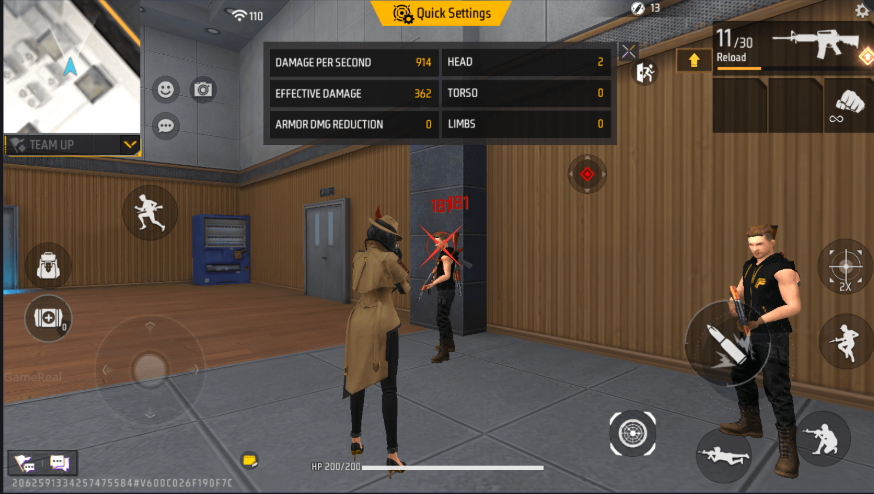
Free Fire One-Tap Headshot Settings 2026
You land in a squad, see an enemy across the map, and you want that perfect one-tap headshot. The crosshair moves a tiny bit and the red number flashes — you feel the power. In 2026, millions of Free Fire players chase exactly this feeling. They search for “Free Fire One-Tap Headshot Settings 2026” hoping for a magic number that guarantees perfect headshots every time.
But here is the honest truth that every serious player needs to hear first:
There is no auto headshot or one-tap headshot button in Free Fire. No official setting, no hidden code, no third-party app can make the game fire a bullet directly at your head. Any “one-tap headshot hack” or “auto headshot sensitivity” you see online is a scam. It will either steal your account, install malware, or get your account permanently banned. Garena’s anti-cheat in 2026 detects every modified client instantly.
One-tap headshots are 100% skill-based. They come from smart sensitivity settings, perfect drag technique, and years of practice in the Training Ground. The right numbers help you aim faster and more accurately, but only you can pull off the one-tap.
This guide gives you the best, tested sensitivity settings for Free Fire One-Tap Headshot in 2026. These work on both Free Fire and Free Fire MAX after OB54 and the latest updates. We will also show you how to adjust them for your phone, RAM, and playstyle.
Why One-Tap Headshots Feel So Good in 2026
In 2026, the meta rewards aggressive players who can land headshots fast. The FO12 shotgun and new weapons make close-range fights even more important. When you land a one-tap, the enemy disappears before they can react. That rush is addictive.
But one-tap headshots are not magic. They depend on:
- High General and Red Dot sensitivity (so your crosshair moves fast when you flick or drag)
- Smooth drag technique (keep your finger moving upward slightly)
- Perfect timing on the fire button
- Good device performance (high FPS helps a lot)
The best players combine these settings with practice. The result? More red numbers, more BOOYAHs, and more fun.
Best One-Tap Headshot Sensitivity Settings for 2026
Here are the most effective settings used by top players right now. These are divided into three categories so you can pick what matches your phone.
1. Balanced Settings (Good for Most Players – 4GB RAM Phones)
- General: 95
- Red Dot: 92
- 2x Scope: 82
- 4x Scope: 72
- Sniper Scope: 37
- Free Look: 82
2. Aggressive One-Tap Settings (For Fast Drag & Confident Players)
- General: 98–100
- Red Dot: 95–100
- 2x Scope: 88–95
- 4x Scope: 78–85
- Sniper Scope: 55–62
- Free Look: 75–82
3. Low-End Phone Settings (2GB–4GB RAM)
- General: 90–95
- Red Dot: 85–90
- 2x Scope: 70–75
- 4x Scope: 60–65
- Sniper Scope: 40–50
- Free Look: 60–70
For High-End Phones (6GB+ RAM / 90Hz–120Hz)
- General: 95–100
- Red Dot: 95–100
- 2x Scope: 85–90
- 4x Scope: 75–80
- Sniper Scope: 30–40
- Free Look: 80–90
These numbers are the same across OB54 and the latest updates in 2026. The key is starting here and tweaking by 2–3 points after testing in the Training Ground.
How to Change These Settings in Free Fire
- Open Free Fire MAX.
- Tap the gear icon (Settings) in the top right.
- Go to the Sensitivity tab on the left menu.
- Adjust each slider one by one.
- Tap Save.
After changing, go to the Training Ground and test 20–30 headshots. Adjust until the crosshair feels natural. Some players also change the fire button size and position for faster tapping.
How to Practice One-Tap Headshots Like a Pro
Practice is more important than perfect settings.
- Spend 10–15 minutes every day in the Training Ground.
- Use weapons like MP40, UMP, or Desert Eagle first — they are easy for one-taps.
- Practice “drag headshots”: Keep your finger moving upward smoothly.
- Use the red number trick: Aim at the chest and drag just a little upward.
- Play casual matches and focus only on landing headshots.
Top players practice 1 hour every day. That is why they land one-taps consistently.
Common Mistakes That Kill Your One-Tap Headshots
- Using the same sensitivity for every phone.
- Forgetting to test in the Training Ground after updating the game.
- Making the fire button too big.
- Playing on low FPS devices.
1. Optimal Sensitivity Settings by Device Performance
In Free Fire, higher sensitivity lets your crosshair travel rapidly from the enemy’s chest to their head during an upward drag. Budget devices with lower RAM and touch response rates benefit from higher sensitivity values, whereas high-end phones with 90Hz–120Hz displays need controlled numbers to prevent over-aiming past the target.
| Sensitivity Scope | Low-End (2GB – 4GB RAM) | Mid-Range (6GB – 8GB RAM) | High-End / Flagship (12GB+ RAM) |
| General | 98 – 100 | 92 – 97 | 85 – 92 |
| Red Dot | 95 – 100 | 88 – 94 | 80 – 86 |
| 2x Scope | 90 – 96 | 82 – 88 | 75 – 82 |
| 4x Scope | 85 – 92 | 78 – 84 | 70 – 76 |
| Sniper Scope | 50 – 60 | 45 – 55 | 40 – 50 |
| Free Look | 70 – 80 | 65 – 75 | 50 – 60 |
Why Scope Values Matter:
-
General: Controls overall camera speed and hip-fire camera rotation. Higher general sensitivity allows effortless upward swipes.
-
Red Dot: Vital for close-range and mid-range single-shot weapons (e.g., M1887, Desert Eagle, Woodpecker) without additional scopes.
-
Sniper Scope: Kept lower to prevent shaky tracking during long-range precision shots.
2. Custom HUD & Fire Button Tuning
A misaligned or oversized fire button restricts thumb drag distance, hindering execution.
-
Fire Button Size: Set your right fire button between 40% and 48%. A smaller size increases your effective drag velocity.
-
Fire Button Position: Place the button in the lower quarter of your right thumb area. Lower positioning grants maximum vertical space to flick the button upward toward the top of your screen.
-
Quick Weapon Switch: Enable ON and place it within reach of your left thumb/index finger. Switching weapons immediately after a shot prevents standing still while reloading.
3. Core One-Tap Drag Mechanics
Having optimal sensitivity helps drag shots connect, but practicing the physical drag motion builds true muscle memory.
-
Crosshair Placement: Keep your crosshair at shoulder or chest level when scanning areas. Never point your crosshair toward the floor while running.
-
Straight Drag: When an opponent stands still or runs straight toward/away from you, drag the fire button straight up toward the top edge of your phone screen.
-
Rotation (“J” Hook) Drag: When an enemy moves laterally across your field of view, curve your fire button in a “J” shape pointing toward the direction of their movement.
-
White Crosshair Trick: Keep your crosshair white (just slightly beside the enemy’s torso) before initiating a drag shot. Dragging from a white crosshair allows auto-aim assist to snap directly onto the head rather than locking onto the chest.
4. Top One-Tap Weapon Choice
Certain firearms deal massive single-shot damage with high armor penetration, making them ideal for landing immediate knockouts:
-
Pistols: Desert Eagle, M500
-
Marksman Rifles: Woodpecker, AC80, SKS
-
Shotguns: M1887, Charge Buster, M1014
Final Thoughts
Free Fire One-Tap Headshot Settings 2026 are not magic numbers. They are tools that help skilled players aim faster and more accurately. The real one-tap headshots come from practice, patience, and a good sensitivity setup.
In 2026, the best players combine these settings with smart drag technique and perfect timing. They enjoy the game without risking their account on scams.
So grab your phone, open the Settings menu, and try the balanced settings first. Test them in the Training Ground. Make small adjustments. And most importantly — play fair.
Your real power in Free Fire comes from how you play, not from any external tool. So keep grinding, keep practicing, and one day those red numbers will light up your screen every single time.
Play safe. Play fair. The battlefield is waiting — and it is much more fun when you win the right way.